
本記事はアフィリエイト広告(PR)を含みます
画像認識の学習を行う上でデータセットを大量に用意するのが難しい場合があります。
既存のデータセットを利用するという方法もありますが、商用利用できない場合も多いし、汎用的なデータで学習されているので、自分用に特化させる場合は自前のデータでファインチューニングする必要があります。
また、データセットが用意できたとしてもアノテーション作業にもかなりの時間がかかります。
画像分類ならラベル付けだけで済みますが、物体認識の場合は1枚ずつバウンティングボックス(BBox)を付与していく必要があります(これをビジネスとしてやっている会社もあるぐらい面倒くさい作業なのです)。

そこで、AI生成画像からデータセットが作れたらデータの準備やアノテーション作業がかなり軽減されるのではないでしょうか?
例えばLLMにプロンプトを生成してもらい、生成したプロンプトを画像生成AIに入力して画像を生成すればデータセット生成の自動化が可能になるはず。
ただOpen AIなどのAPIは従量課金制なので大量生成には不向きです。
そこで今回はローカルLLMのOllamaでプロンプトを生成し、ローカル環境で動作するStable Diffusionで画像生成することによりプロンプト生成から画像生成の自動化を目指します。
1. 前提条件
実行環境はこちら。
- OS:Windows 11
- GPU:GeForce RTX 5070 Ti
- VRAM:16GB
- Ollama:0.32.5
- Stable Diffusion:1.5
1.1. データセットの生成方法
アノテーションデータも付与するとなると、画像生成と同時にBBoxやラベルデータも必要になります。
Stable Diffusionなどの画像生成AI単体では、画像を生成することはできても生成した画像に写っている被写体の位置情報を取得することはできません。
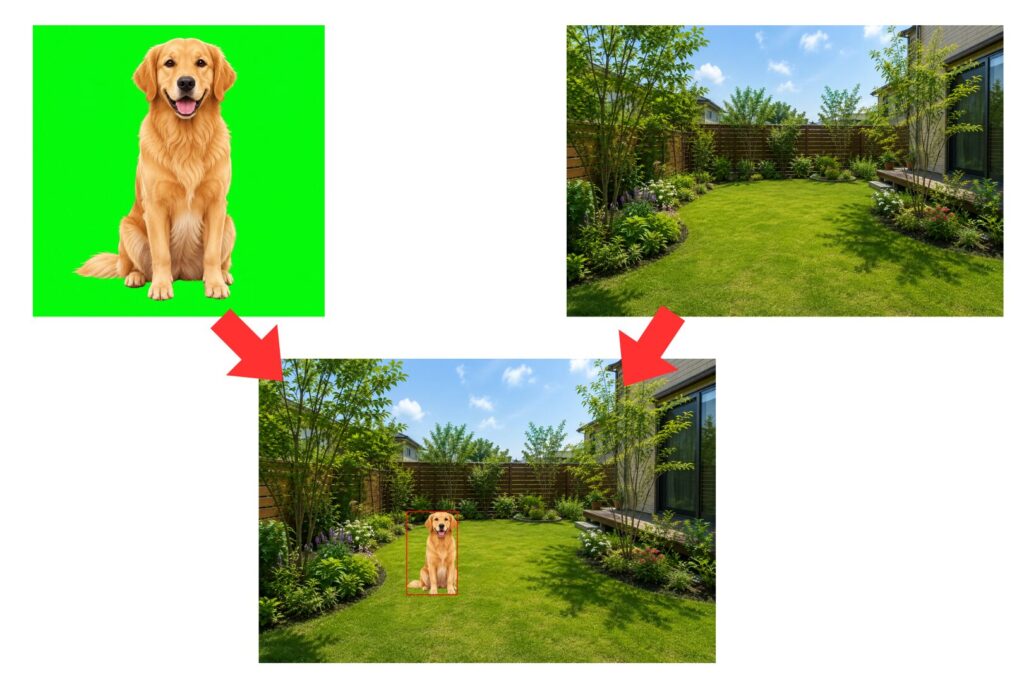
そこで、
- グリーンバック+被写体の画像
- 背景画像
の2種類の画像を生成し、合成することで位置、サイズ、ラベルなどのアノテーション情報を手動で指定できるのではないかと考えました。
1.2. 生成する被写体
今回はグリーンバックの中央にいろんな種類、サイズ、ポーズの犬と猫の画像を100枚生成する指示を出して、実際に生成された画像を確認してみます。
2. Ollamaによるプロンプト自動生成
今回はPython経由で動かすので、まずはOllamaのライブラリをインストールします。
pip install ollama-160x90.jpg)
次に以下のコードで、犬か猫の画像をStable Diffusionで生成するための英語プロンプトを100個生成してCSVに保存します。
import csv
import random
import re
import time
from pathlib import Path
import ollama

MODEL_NAME = "qwen3:8b"
OUTPUT_FILE = Path("animal_prompts.csv")
NUM_PROMPTS = 100

DOG_BREEDS = [
    "Golden Retriever",
    "Labrador Retriever",
    "Shiba Inu",
    "German Shepherd",
    "Beagle",
    "Border Collie",
    "French Bulldog",
    "Siberian Husky",
    "Toy Poodle",
    "Dachshund",
    "Chihuahua",
    "Dalmatian",
    "Pembroke Welsh Corgi",
    "Australian Shepherd",
    "mixed-breed dog",
]

CAT_BREEDS = [
    "British Shorthair cat",
    "American Shorthair cat",
    "Scottish Fold cat",
    "Maine Coon cat",
    "Siamese cat",
    "Bengal cat",
    "Persian cat",
    "Russian Blue cat",
    "Ragdoll cat",
    "Norwegian Forest cat",
    "Calico cat",
    "Tuxedo cat",
    "Tabby cat",
    "white domestic cat",
    "black domestic cat",
]

DOG_POSES = [
    "standing and facing the camera",
    "sitting and facing the camera",
    "standing in side profile",
    "walking naturally",
    "running",
    "lying down",
    "looking slightly upward",
    "looking to the left",
    "looking to the right",
    "playfully raising one front paw",
    "stretching",
]

CAT_POSES = [
    "standing and facing the camera",
    "sitting and facing the camera",
    "standing in side profile",
    "walking naturally",
    "running",
    "lying down",
    "crouching",
    "looking slightly upward",
    "looking to the left",
    "looking to the right",
    "playfully raising one front paw",
    "stretching",
]

VIEWPOINTS = [
    "eye-level view",
    "slightly elevated view",
    "slightly low-angle view",
    "three-quarter front view",
    "side view",
]

# 画面内で対象物が占める大きさ
OBJECT_SIZES = [
    {
        "name": "small",
        "description": (
            "the entire animal occupies approximately 25 to 35 percent "
            "of the image height"
        ),
    },
    {
        "name": "medium",
        "description": (
            "the entire animal occupies approximately 40 to 55 percent "
            "of the image height"
        ),
    },
    {
        "name": "large",
        "description": (
            "the entire animal occupies approximately 60 to 75 percent "
            "of the image height"
        ),
    },
]

APPEARANCES = [
    "realistic natural fur",
    "highly detailed fur",
    "soft natural fur texture",
    "photorealistic appearance",
]

LIGHTING = [
    "soft uniform studio lighting",
    "diffused frontal studio lighting",
    "balanced shadowless studio lighting",
]


NEGATIVE_PROMPT = (
    "multiple animals, extra animal, duplicate animal, cropped body, "
    "body outside frame, missing legs, extra legs, malformed paws, "
    "deformed anatomy, distorted face, two heads, accessories, collar, "
    "leash, clothes, toy, furniture, floor, horizon, scenery, grass, "
    "uneven background, gradient background, textured background, "
    "background objects, shadows on background, text, watermark, logo, "
    "border, frame, blur, low quality"
)


def remove_thinking_text(text: str) -> str:
    """Qwen系モデルが出力する可能性があるthinkタグなどを除去する。"""
    text = re.sub(
        r"<think>.*?</think>",
        "",
        text,
        flags=re.DOTALL | re.IGNORECASE,
    )
    return text.strip().strip('"').strip("'")


def select_conditions() -> dict:
    """動物、種類、ポーズ、サイズなどをPython側で抽選する。"""
    animal = random.choice(["dog", "cat"])

    if animal == "dog":
        breed = random.choice(DOG_BREEDS)
        pose = random.choice(DOG_POSES)
    else:
        breed = random.choice(CAT_BREEDS)
        pose = random.choice(CAT_POSES)

    object_size = random.choice(OBJECT_SIZES)

    return {
        "animal": animal,
        "breed": breed,
        "pose": pose,
        "viewpoint": random.choice(VIEWPOINTS),
        "size_name": object_size["name"],
        "size_description": object_size["description"],
        "appearance": random.choice(APPEARANCES),
        "lighting": random.choice(LIGHTING),
    }


def build_instruction(conditions: dict) -> str:
    """Ollamaに渡す指示文を作成する。"""
    return f"""
Create one concise English positive prompt for Stable Diffusion.

The generated image will be used as synthetic training data for object detection.

Required conditions:
- Canvas size: 512 x 512 pixels
- Exactly one animal
- Animal category: {conditions["animal"]}
- Breed or appearance: {conditions["breed"]}
- Pose: {conditions["pose"]}
- Viewpoint: {conditions["viewpoint"]}
- Object size: {conditions["size_description"]}
- Place the complete animal at the exact center of the image
- Show the entire body, including all legs, paws, ears, and tail
- Background must be a perfectly uniform pure chroma green
- Use the exact background color RGB(0, 255, 0), hex #00FF00
- No floor, no horizon, no scenery and no background objects
- No other animal or object
- {conditions["appearance"]}
- {conditions["lighting"]}
- Preserve a clear margin between the animal and all image edges
- Make the animal boundary clear for chroma-key extraction

Output only the finished English Stable Diffusion prompt.
Do not output explanations, headings, quotation marks, JSON or Markdown.
""".strip()


def generate_prompt(conditions: dict) -> str:
    """OllamaでStable Diffusion用プロンプトを生成する。"""
    instruction = build_instruction(conditions)

    response = ollama.generate(
        model=MODEL_NAME,
        prompt=instruction,
        think=False,
        stream=False,
        options={
            "temperature": 0.8,
            "top_p": 0.9,
            "num_predict": 256,
        },
    )

    # 通常回答を取得
    response_text = response.get("response", "")

    # 念のためthinking側も確認
    thinking_text = response.get("thinking", "")

    prompt = remove_thinking_text(
        response_text or thinking_text or ""
    )

    if not prompt:
        print("Ollama raw response:")
        print(response)
        raise RuntimeError("Ollamaから空の応答が返されました。")

    return " ".join(prompt.split())


def save_prompts(rows: list[dict]) -> None:
    """生成結果をCSVとして保存する。"""
    fieldnames = [
        "id",
        "animal",
        "breed",
        "pose",
        "viewpoint",
        "object_size",
        "width",
        "height",
        "positive_prompt",
        "negative_prompt",
    ]

    with OUTPUT_FILE.open("w", encoding="utf-8-sig", newline="") as file:
        writer = csv.DictWriter(file, fieldnames=fieldnames)
        writer.writeheader()
        writer.writerows(rows)


def main() -> None:
    rows = []

    print(f"Model: {MODEL_NAME}")
    print(f"Generating {NUM_PROMPTS} prompts...")

    total_start = time.perf_counter()

    for index in range(1, NUM_PROMPTS + 1):
        conditions = select_conditions()

        start = time.perf_counter()
        try:
            positive_prompt = generate_prompt(conditions)
        except ollama.ResponseError as error:
            print(f"[{index}] Ollama error: {error.error}")
            continue
        except Exception as error:
            print(f"[{index}] Error: {error}")
            continue
        elapsed = time.perf_counter() - start

        row = {
            "id": index,
            "animal": conditions["animal"],
            "breed": conditions["breed"],
            "pose": conditions["pose"],
            "viewpoint": conditions["viewpoint"],
            "object_size": conditions["size_name"],
            "width": 512,
            "height": 512,
            "positive_prompt": positive_prompt,
            "negative_prompt": NEGATIVE_PROMPT,
        }
        rows.append(row)

        print(
            f"[{index:04d}/{NUM_PROMPTS}] "
            f"{conditions['breed']} / "
            f"{conditions['pose']} / "
            f"{conditions['size_name']}"
        )
        print(f"  {positive_prompt}")

        print(
            f"[{index:04d}/{NUM_PROMPTS}] "
            f"{conditions['breed']} "
            f"({elapsed:.2f} sec)"
        )

        # 途中終了しても生成済みデータが残るよう毎回保存
        save_prompts(rows)

        # CPU使用率を少し抑えたい場合の短い待機
        time.sleep(0.1)

    total_elapsed = time.perf_counter() - total_start

    print()
    print(f"Completed: {len(rows)} prompts")
    print(f"Saved to: {OUTPUT_FILE.resolve()}")

    print(f"\nTotal Time : {total_elapsed:.2f} sec")
    print(f"Average    : {total_elapsed/len(rows):.2f} sec/prompt")


if __name__ == "__main__":
    main()
流れとしては以下の通りです。
- 犬か猫をランダムで選択
- 種類、ポーズ、視点、大きさをランダムで選択
- OllamaにStable Diffusion用プロンプトを書かせる
- 生成結果をCSVへ保存
- 100回繰り返す
今回使用したモデルはQwen3:8Bです。
ここでは犬か猫が一匹だけ写った画像、背景グリーンバックを指定するようなプロンプトを生成するような指示をしています。
プロンプト生成は1件あたり約1.39秒、100件で約140秒ぐらいかかりました。
3. Stable Diffusionによる画像生成
生成されたCSVを読み込んで画像生成を行う部分を実装します。
targetフォルダを作成してその中にdogフォルダとcatフォルダを作成し、犬の画像が生成されたらdogフォルダへ、猫の画像が生成されたらcatフォルダへ保存しています。
またサイズは512×512固定でモデルはSD1.5を使用しています。
※ローカルでStable Diffusionを実行する場合はPyTorchのインストールが必要です。

import csv
import random
import re
import time
from pathlib import Path

import torch
from diffusers import StableDiffusionPipeline


# ============================================================
# 設定
# ============================================================

CSV_PATH = Path("animal_prompts.csv")
TARGET_DIR = Path("target")

DOG_DIR = TARGET_DIR / "dog"
CAT_DIR = TARGET_DIR / "cat"

MODEL_ID = "stable-diffusion-v1-5/stable-diffusion-v1-5"

IMAGE_WIDTH = 512
IMAGE_HEIGHT = 512

NUM_INFERENCE_STEPS = 25
GUIDANCE_SCALE = 7.5

# Trueの場合、すでに画像が存在する行は処理しない
SKIP_EXISTING = True

# Noneなら毎回ランダムなseedを使用
BASE_SEED = None


# ============================================================
# 共通処理
# ============================================================

def create_output_directories() -> None:
    """出力先フォルダを作成する。"""
    DOG_DIR.mkdir(parents=True, exist_ok=True)
    CAT_DIR.mkdir(parents=True, exist_ok=True)


def load_pipeline() -> StableDiffusionPipeline:
    """Stable Diffusionパイプラインを読み込む。"""
    if not torch.cuda.is_available():
        raise RuntimeError(
            "CUDA対応GPUを認識できません。"
            "PyTorchのCUDA版がインストールされているか確認してください。"
        )

    print(f"Loading model: {MODEL_ID}")
    print(f"GPU: {torch.cuda.get_device_name(0)}")

    pipe = StableDiffusionPipeline.from_pretrained(
        MODEL_ID,
        torch_dtype=torch.float16,
        use_safetensors=True,
    )

    pipe = pipe.to("cuda")

    # VRAM使用量を抑える
    pipe.enable_attention_slicing()

    # 推論専用
    pipe.set_progress_bar_config(disable=False)

    return pipe


def normalize_animal(animal: str) -> str:
    """animal列をdogまたはcatへ正規化する。"""
    value = animal.strip().lower()

    if value in {"dog", "dogs", "犬"}:
        return "dog"

    if value in {"cat", "cats", "猫"}:
        return "cat"

    raise ValueError(f"未対応のanimalです: {animal}")


def sanitize_filename(value: str) -> str:
    """Windowsで使えないファイル名文字を置換する。"""
    value = value.strip()
    value = re.sub(r'[\\/:*?"<>|]', "_", value)
    value = re.sub(r"\s+", "_", value)
    return value[:80]


def get_output_directory(animal: str) -> Path:
    """動物種に対応した保存先を返す。"""
    if animal == "dog":
        return DOG_DIR

    if animal == "cat":
        return CAT_DIR

    raise ValueError(f"未対応のanimalです: {animal}")


def create_seed(row_index: int) -> int:
    """画像生成に使用するseedを作成する。"""
    if BASE_SEED is not None:
        return BASE_SEED + row_index

    return random.randint(0, 2**31 - 1)


def create_output_path(
    row: dict,
    row_index: int,
    animal: str,
) -> Path:
    """保存先ファイルパスを作成する。"""
    output_dir = get_output_directory(animal)

    csv_id = row.get("id", "").strip()
    breed = sanitize_filename(row.get("breed", animal))

    if csv_id:
        filename = f"{int(csv_id):05d}_{breed}.png"
    else:
        filename = f"{row_index:05d}_{breed}.png"

    return output_dir / filename


def read_csv_rows(csv_path: Path) -> list[dict]:
    """CSVファイルを読み込む。"""
    if not csv_path.exists():
        raise FileNotFoundError(
            f"CSVファイルが見つかりません: {csv_path.resolve()}"
        )

    # 前回のスクリプトはutf-8-sigで出力しているため、
    # BOMを除去できるutf-8-sigで読み込む
    with csv_path.open(
        "r",
        encoding="utf-8-sig",
        newline="",
    ) as file:
        reader = csv.DictReader(file)
        rows = list(reader)

    if not rows:
        raise RuntimeError("CSVにデータ行がありません。")

    required_columns = {
        "animal",
        "positive_prompt",
        "negative_prompt",
    }

    fieldnames = set(reader.fieldnames or [])
    missing_columns = required_columns - fieldnames

    if missing_columns:
        missing = ", ".join(sorted(missing_columns))
        raise RuntimeError(
            f"CSVに必要な列がありません: {missing}"
        )

    return rows


# ============================================================
# 画像生成
# ============================================================

def generate_image(
    pipe: StableDiffusionPipeline,
    positive_prompt: str,
    negative_prompt: str,
    seed: int,
):
    """プロンプトから512×512画像を生成する。"""
    generator = torch.Generator(device="cuda")
    generator.manual_seed(seed)

    with torch.inference_mode():
        result = pipe(
            prompt=positive_prompt,
            negative_prompt=negative_prompt,
            width=IMAGE_WIDTH,
            height=IMAGE_HEIGHT,
            num_inference_steps=NUM_INFERENCE_STEPS,
            guidance_scale=GUIDANCE_SCALE,
            generator=generator,
        )

    return result.images[0]


def main() -> None:
    total_start = time.perf_counter()

    create_output_directories()
    rows = read_csv_rows(CSV_PATH)

    print(f"CSV: {CSV_PATH.resolve()}")
    print(f"Rows: {len(rows)}")
    print(f"Output: {TARGET_DIR.resolve()}")
    print()

    pipe = load_pipeline()

    success_count = 0
    skipped_count = 0
    error_count = 0
    generation_times = []

    try:
        for row_index, row in enumerate(rows, start=1):
            row_start = time.perf_counter()

            try:
                animal = normalize_animal(row["animal"])

                positive_prompt = row[
                    "positive_prompt"
                ].strip()

                negative_prompt = row.get(
                    "negative_prompt",
                    "",
                ).strip()

                if not positive_prompt:
                    raise ValueError(
                        "positive_promptが空です。"
                    )

                output_path = create_output_path(
                    row=row,
                    row_index=row_index,
                    animal=animal,
                )

                if SKIP_EXISTING and output_path.exists():
                    skipped_count += 1

                    print(
                        f"[{row_index:04d}/{len(rows):04d}] "
                        f"SKIP: {output_path}"
                    )
                    continue

                seed = create_seed(row_index)

                print(
                    f"[{row_index:04d}/{len(rows):04d}] "
                    f"Generating {animal}"
                )
                print(
                    f"  Breed : "
                    f"{row.get('breed', '')}"
                )
                print(f"  Seed  : {seed}")

                image = generate_image(
                    pipe=pipe,
                    positive_prompt=positive_prompt,
                    negative_prompt=negative_prompt,
                    seed=seed,
                )

                image.save(output_path)

                elapsed = time.perf_counter() - row_start
                generation_times.append(elapsed)
                success_count += 1

                print(f"  Saved : {output_path}")
                print(f"  Time  : {elapsed:.2f} sec")
                print()

            except Exception as error:
                error_count += 1

                print(
                    f"[{row_index:04d}/{len(rows):04d}] "
                    f"ERROR: {error}"
                )
                print()

    finally:
        # パイプラインとGPUメモリを解放
        del pipe
        torch.cuda.empty_cache()

    total_elapsed = time.perf_counter() - total_start

    print("=" * 60)
    print("Completed")
    print(f"Success : {success_count}")
    print(f"Skipped : {skipped_count}")
    print(f"Errors  : {error_count}")
    print(f"Total   : {total_elapsed:.2f} sec")

    if generation_times:
        average = sum(generation_times) / len(generation_times)
        print(f"Average : {average:.2f} sec/image")

    print(f"Dog dir : {DOG_DIR.resolve()}")
    print(f"Cat dir : {CAT_DIR.resolve()}")


if __name__ == "__main__":
    main()
処理時間は1件当たり約1.61秒、全体で約200秒かかりました。

4. 動作確認
では実際に生成された画像を見てみましょう。
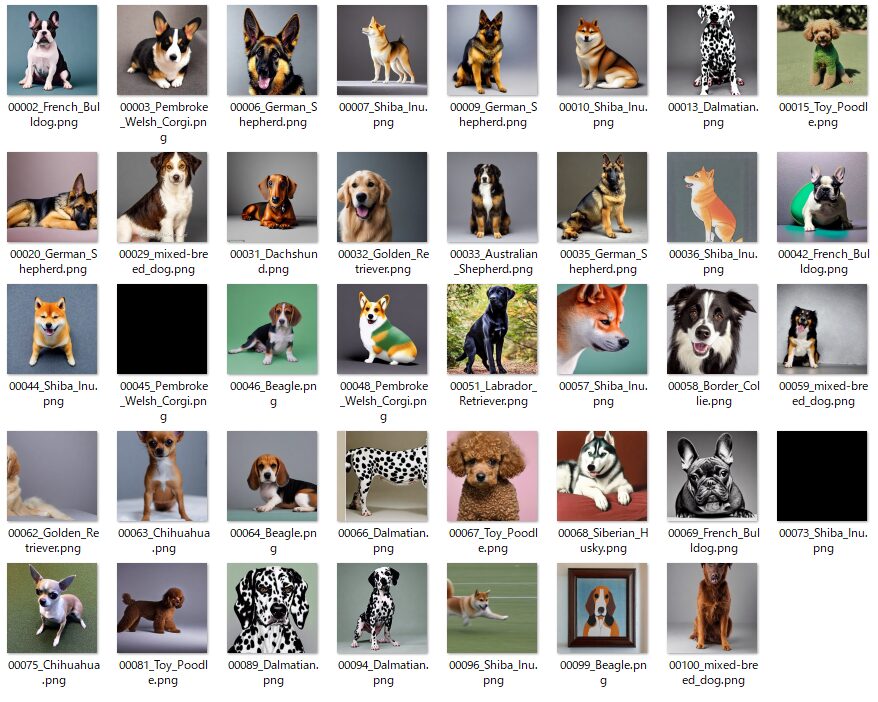
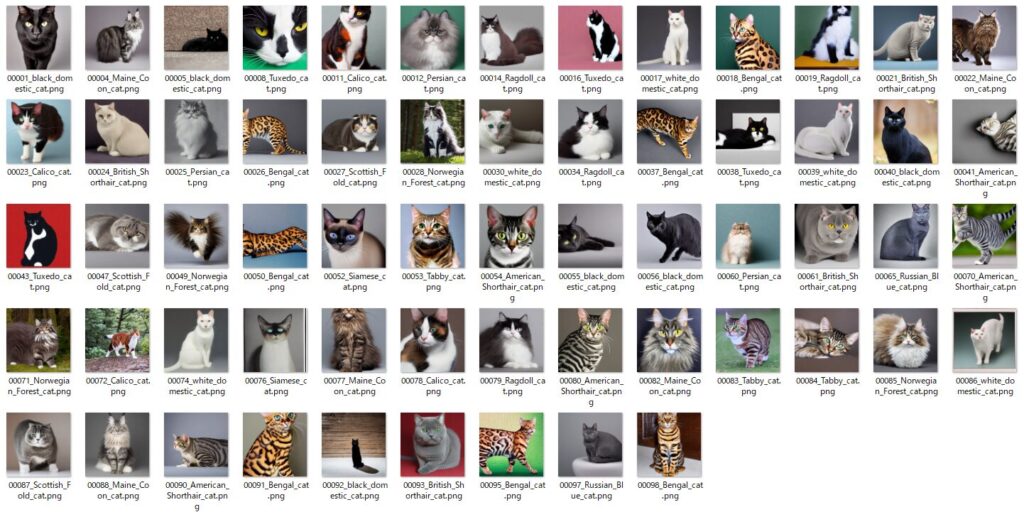
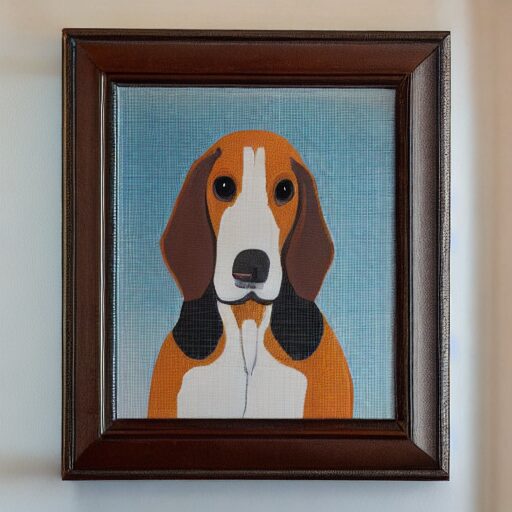
ぱっと見犬と猫は認識できますが、何枚か生成に失敗していたり、途切れていたり、そもそもグリーンバックの指示が無視されてしまっているのが気になります。
もっと精度の高いモデルを使えば多少改善するかもしれませんが、背景は別の方法を考えたほうか確実かもしれません。
個人的にはこれがお気に入りです。
5. まとめ
今回はローカルLLMのOllamaでプロンプトを生成し、Stable Diffusionで画像生成をしてみました。
軽いモデルを使用しましたが、100枚分のプロンプト生成~画像生成まで5~6分程度だったのでもっと高精度なモデルを使ってもよさそうです。
AI生成画像をデータセットとして使うには背景を除去してマスクできるようにしたいですね。
BiRefNetなど背景除去用のモデルも試してみたいです。
今回は以上です。

6. 参考サイト
【ローカルLLM】Ollama Python Libraryのメソッド一覧と動作例
https://qiita.com/LiberalArts/items/6492e54d479789eddbcd


コメント