

本記事はアフィリエイト広告(PR)を含みます
Deep Learningで画像認識を行う場合、まずは画像を集めて学習用のデータセットを作る必要があります。
画像を集めたら、被写体の位置やラベル付けを行う「アノテーション」という作業も必要になります。
これらの作業を大量の画像に対して行う必要がありますが、実画像を十分に用意できない場合、AIで画像を生成して学習用のデータセットを作成できれば、画像収集やアノテーションの手間を減らせるのではないでしょうか?
そこで今回は、画像生成AIで作成した画像を使って学習用データセットを自動生成し、COCOフォーマットで保存する方法についてまとめました。

1. データセット自動生成の流れ
物体検出やセグメンテーション用のデータセットでは、画像のほかに
- 被写体(target)のBBoxとラベル
- マスクデータ
なども必要になります。
学習させるには、画像の中で被写体がどの位置にどのサイズで写っているかという情報を与える必要があります。
また検出した被写体のラベル(何が写っているか)という情報も必要です。
セグメンテーションモデルを使う場合はマスクデータも必要になります。
ただ画像生成しただけではこれらの情報を付与することはできません。
Stable Diffusionなどの画像生成AIは何をどの位置に生成したかはわからないので、アノテーションを別途行う必要があります。
そこで、被写体画像と背景画像を別々に生成し、被写体画像から背景を除去して背景画像に配置することで、画像生成と同時にアノテーションデータを付与したデータセットが生成できるのではないかと考えました。
データセット生成の流れとしては、以下のようになります。
- 画像生成用プロンプトの生成
- 被写体画像の生成
- 背景画像の生成
- 被写体画像から背景を除去
- 背景画像に被写体画像(背景除去済み)をサイズや位置をランダムに変えて配置
- 生成した画像をCOCOフォーマットで出力
今回は物体認識をして犬と猫の判別を行うためのモデルを想定しているので、被写体画像は犬と猫の画像を生成します。
2. COCOフォーマットとは
COCOフォーマット(COCO形式)は、画像と、画像に写っている位置やラベル、領域などを管理するためのデータセット形式です。
COCOはCommon Objects in Contextの略で、物体検出やインスタンスセグメンテーションなどに使われています。
例えば、画像内に犬が1匹写っている場合、COCOフォーマットでは主に次のような情報をJSONファイルに保存します。
{
    "id": 1,
    "image_id": 1,
    "category_id": 1,
    "bbox": [120, 200, 150, 180],
    "area": 27000,
    "segmentation": [
        [...]
    ],
    "iscrowd": 0
}
それぞれの意味は以下の通りです。
| Key | 意味 |
|---|---|
| id | アノテーション情報識別ID |
| image_id | 画像ID |
| category_id | 犬、猫などのクラス |
| bbox | 物体を囲む矩形領域 [X座標、Y座標、幅、高さ] |
| area | 物体領域の面積 |
| segmentation | 物体のマスク情報 |
| iscrowd | 複数の物体を塊として扱うか |
本記事ではBiRefNetで取得した犬と猫のマスクを利用してBBoxとSegmentationを自動生成し、画像と一緒にCOCOフォーマットで保存するという流れになります。
3. Ollamaによる画像生成用プロンプトの生成
まずは画像生成用のプロンプトを生成する部分を実装します。
プロンプトの生成にはローカルLLMのOllamaを使用します。

3.1. 被写体画像生成用プロンプト
Stable Diffusionで犬と猫の画像を生成するためのプロンプトをOllamaで作成します。
import random
import re
import time
import ollama

MODEL_NAME = "qwen3:8b"

DOG_BREEDS = [
    "Golden Retriever",
    "Labrador Retriever",
    "Shiba Inu",
    "German Shepherd",
    "Beagle",
    "Border Collie",
    "French Bulldog",
    "Siberian Husky",
    "Toy Poodle",
    "Dachshund",
    "Chihuahua",
    "Dalmatian",
    "Pembroke Welsh Corgi",
    "Australian Shepherd",
    "mixed-breed dog",
]

CAT_BREEDS = [
    "British Shorthair cat",
    "American Shorthair cat",
    "Scottish Fold cat",
    "Maine Coon cat",
    "Siamese cat",
    "Bengal cat",
    "Persian cat",
    "Russian Blue cat",
    "Ragdoll cat",
    "Norwegian Forest cat",
    "Calico cat",
    "Tuxedo cat",
    "Tabby cat",
    "white domestic cat",
    "black domestic cat",
]

DOG_POSES = [
    "standing and facing the camera",
    "sitting and facing the camera",
    "standing in side profile",
    "walking naturally",
    "running",
    "lying down",
    "looking slightly upward",
    "looking to the left",
    "looking to the right",
    "playfully raising one front paw",
    "stretching",
]

CAT_POSES = [
    "standing and facing the camera",
    "sitting and facing the camera",
    "standing in side profile",
    "walking naturally",
    "running",
    "lying down",
    "crouching",
    "looking slightly upward",
    "looking to the left",
    "looking to the right",
    "playfully raising one front paw",
    "stretching",
]

VIEWPOINTS = [
    "eye-level view",
    "slightly elevated view",
    "slightly low-angle view",
    "three-quarter front view",
    "side view",
]

OBJECT_SIZES = [
    {
        "name": "small",
        "description": (
            "the entire animal occupies approximately 25 to 35 percent "
            "of the image height"
        ),
    },
    {
        "name": "medium",
        "description": (
            "the entire animal occupies approximately 40 to 55 percent "
            "of the image height"
        ),
    },
    {
        "name": "large",
        "description": (
            "the entire animal occupies approximately 60 to 75 percent "
            "of the image height"
        ),
    },
]

APPEARANCES = [
    "realistic natural fur",
    "highly detailed fur",
    "soft natural fur texture",
    "photorealistic appearance",
]

LIGHTING = [
    "soft uniform studio lighting",
    "diffused frontal studio lighting",
    "balanced shadowless studio lighting",
]

# 背景除去しやすいよう、単色・無地・高コントラストを指定。
# 背景色そのものは生成AI側に選ばせる。
BACKGROUND_CONDITION = (
    "a perfectly uniform solid-color studio background with no texture, "
    "gradient, floor, horizon, scenery, shadows, or background objects; "
    "choose a background color that strongly contrasts with the animal's fur "
    "and makes the animal boundary easy to separate during background removal"
)

NEGATIVE_PROMPT = (
    "multiple animals, extra animal, duplicate animal, "
    "close-up, portrait, "
    "cropped body, cropped head, cropped legs, cropped paws, cropped tail, "
    "body outside frame, out of frame, "
    "missing legs, extra legs, malformed paws, "
    "deformed anatomy, distorted face, two heads, "
    "accessories, collar, leash, clothes, toy, furniture, "
    "floor, horizon, scenery, grass, "
    "uneven background, gradient background, textured background, "
    "background objects, shadows on background, "
    "text, watermark, logo, border, frame, blur, low quality"
)


def remove_thinking_text(text: str) -> str:
    """Qwen系モデルが出力する可能性があるthinkタグなどを除去する。"""
    text = re.sub(
        r"<think>.*?</think>",
        "",
        text,
        flags=re.DOTALL | re.IGNORECASE,
    )
    return text.strip().strip('"').strip("'")


def select_conditions(animal: str) -> dict:
    """指定された動物について、種類・ポーズ・サイズなどをPython側で抽選する。"""
    if animal == "dog":
        breed = random.choice(DOG_BREEDS)
        pose = random.choice(DOG_POSES)
    elif animal == "cat":
        breed = random.choice(CAT_BREEDS)
        pose = random.choice(CAT_POSES)
    else:
        raise ValueError("animal must be 'dog' or 'cat'")

    object_size = random.choice(OBJECT_SIZES)

    return {
        "animal": animal,
        "breed": breed,
        "pose": pose,
        "viewpoint": random.choice(VIEWPOINTS),
        "size_name": object_size["name"],
        "size_description": object_size["description"],
        "appearance": random.choice(APPEARANCES),
        "lighting": random.choice(LIGHTING),
    }


def build_instruction(conditions: dict) -> str:
    """Ollamaに渡す指示文を作成する。"""
    return f"""
Create one concise English positive prompt for Stable Diffusion.

The generated image will be used as synthetic training data for object detection.

Required conditions:
- Canvas size: 512 x 512 pixels
- Exactly one animal
- Animal category: {conditions["animal"]}
- Breed or appearance: {conditions["breed"]}
- Pose: {conditions["pose"]}
- Viewpoint: {conditions["viewpoint"]}
- Object size: {conditions["size_description"]}
- Place the complete animal at the exact center of the image
- Full-body composition
- The entire animal must be visible from head to tail
- Show all four legs and all paws completely
- Show both ears and the entire tail completely
- No part of the animal may extend outside the image frame
- Leave a clear empty margin around the entire animal
- Background: {BACKGROUND_CONDITION}
- No other animal or object
- {conditions["appearance"]}
- {conditions["lighting"]}
- Preserve a clear margin between the animal and all image edges
- Make the animal boundary clear and easy to separate from the background

Output only the finished English Stable Diffusion prompt.
Do not output explanations, headings, quotation marks, JSON or Markdown.
""".strip()


def generate_prompt(conditions: dict) -> str:
    """OllamaでStable Diffusion用プロンプトを1件生成する。"""
    instruction = build_instruction(conditions)

    response = ollama.generate(
        model=MODEL_NAME,
        prompt=instruction,
        think=False,
        stream=False,
        options={
            "temperature": 0.8,
            "top_p": 0.9,
            "num_predict": 256,
        },
    )

    response_text = response.get("response", "")
    thinking_text = response.get("thinking", "")

    prompt = remove_thinking_text(
        response_text or thinking_text or ""
    )

    if not prompt:
        raise RuntimeError("Ollamaから空の応答が返されました。")

    return " ".join(prompt.split())


def generate_animal_prompts(
    dog_count: int,
    cat_count: int,
    retry_until_complete: bool = True,
) -> list[str]:
    """
    犬と猫のStable Diffusion用プロンプトを指定数生成して返す。

    例:
        prompts = generate_animal_prompts(1000, 1000)
        # len(prompts) == 2000

    戻り値:
        犬のプロンプト dog_count 件 +
        猫のプロンプト cat_count 件を格納したlist[str]

    retry_until_complete=True の場合、
    Ollamaで一時的なエラーが発生しても指定件数に達するまで再試行する。
    """
    if dog_count < 0 or cat_count < 0:
        raise ValueError("dog_count and cat_count must be 0 or greater")

    prompts: list[str] = []

    targets = [
        ("dog", dog_count),
        ("cat", cat_count),
    ]

    total_count = dog_count + cat_count
    completed = 0
    total_start = time.perf_counter()

    for animal, count in targets:
        generated = 0

        while generated < count:
            conditions = select_conditions(animal)
            start = time.perf_counter()

            try:
                positive_prompt = generate_prompt(conditions)

            except ollama.ResponseError as error:
                print(
                    f"[{completed + 1}/{total_count}] "
                    f"Ollama error ({animal}): {error.error}"
                )
                if not retry_until_complete:
                    generated += 1
                    completed += 1
                time.sleep(0.1)
                continue

            except Exception as error:
                print(
                    f"[{completed + 1}/{total_count}] "
                    f"Error ({animal}): {error}"
                )
                if not retry_until_complete:
                    generated += 1
                    completed += 1
                time.sleep(0.1)
                continue

            elapsed = time.perf_counter() - start

            prompts.append(positive_prompt)
            generated += 1
            completed += 1

            print(
                f"[{completed:04d}/{total_count}] "
                f"{animal} / {conditions['breed']} / "
                f"{conditions['pose']} / "
                f"{conditions['size_name']} "
                f"({elapsed:.2f} sec)"
            )

            time.sleep(0.1)

    total_elapsed = time.perf_counter() - total_start

    print()
    print(f"Completed : {len(prompts)} prompts")
    print(f"Dog       : {dog_count}")
    print(f"Cat       : {cat_count}")
    print(f"Total Time: {total_elapsed:.2f} sec")

    if prompts:
        print(f"Average   : {total_elapsed / len(prompts):.2f} sec/prompt")

    return prompts
すべて同じ犬・猫を生成するとデータセットに偏りが出てしまうので、種類やポーズ、撮影方向などを複数用意してその中からランダムに条件を選択できるようにします。
DOG_BREEDS = [
    "Golden Retriever",
    "Labrador Retriever",
    "Shiba Inu",
    ...
]

DOG_POSES = [
    "standing and facing the camera",
    "sitting and facing the camera",
    "walking naturally",
    "running",
    ...
]

VIEWPOINTS = [
    "eye-level view",
    "slightly elevated view",
    "slightly low-angle view",
    "side view",
]
select_conditions()では、これらの候補からrandom.choice()を使って生成条件をランダムに選択します。
return {
    "animal": animal,
    "breed": breed,
    "pose": pose,
    "viewpoint": random.choice(VIEWPOINTS),
    "size_name": object_size["name"],
    "size_description": object_size["description"],
    "appearance": random.choice(APPEARANCES),
    "lighting": random.choice(LIGHTING),
}
選択した条件をOllamaに渡し、Stable Diffusion用の英語プロンプトを生成します。
この時、後からBiRefNetで背景除去しやすいように犬・猫の全身を画像に収めること、被写体と区別しやすい単色背景にすることなども指定しています。
また、ネガティブプロンプトでは複数の動物、体の見切れ、余分な足、背景オブジェクトを生成しないように指定します。
最後に、generate_animal_prompts()で犬と猫のプロンプトをそれぞれ指定した数だけ生成します。
target_list = generate_animal_prompts(
    dog_count=1000,
    cat_count=1000,
)
この場合は犬1000匹+猫1000匹の合計2000匹分のプロンプトがlist[str]として返されます。
3.2. 背景画像生成用プロンプト
被写体とは別に、犬・猫を配置するための背景画像生成用のプロンプトを作成します。
import random
import re
import time

import ollama


MODEL_NAME = "qwen3:8b"


BACKGROUND_TYPES = [
    "modern city street",
    "quiet residential street",
    "urban sidewalk",
    "public park",
    "forest path",
    "grassy field",
    "sandy beach",
    "mountain landscape",
    "riverside",
    "lakeside",
    "garden",
    "backyard",
    "indoor living room",
    "wooden floor room",
    "modern office",
    "warehouse interior",
    "concrete industrial area",
    "parking lot",
    "train station platform",
    "shopping street",
    "country road",
    "suburban road",
    "school playground",
    "open plaza",
    "stone pavement",
    "wooden deck",
    "farm field",
    "hill landscape",
    "forest clearing",
    "indoor hallway",
]


WEATHER = [
    "clear weather",
    "slightly cloudy weather",
    "overcast weather",
    "soft cloudy weather",
]


TIME_OF_DAY = [
    "morning",
    "daytime",
    "late afternoon",
    "early evening",
]


LIGHTING = [
    "soft natural lighting",
    "diffused natural lighting",
    "realistic ambient lighting",
    "balanced natural lighting",
]


SEASON = [
    "spring",
    "summer",
    "autumn",
    "winter",
]


CAMERA_VIEW = [
    "eye-level view",
    "slightly low-angle view",
    "slightly elevated view",
    "natural human eye perspective",
    "wide-angle environmental view",
]


def remove_thinking_text(text: str) -> str:
    """
    Qwen系モデルが返す可能性がある
    <think>...</think> を除去する。
    """

    text = re.sub(
        r"<think>.*?</think>",
        "",
        text,
        flags=re.DOTALL | re.IGNORECASE,
    )

    return text.strip().strip('"').strip("'")


def select_background_conditions(
    include_person: bool = False,
) -> dict:
    """
    背景画像の条件をランダムに選択する。
    include_person=True の場合は人物を含む背景にする。
    """

    return {
        "background_type": random.choice(BACKGROUND_TYPES),
        "weather": random.choice(WEATHER),
        "time_of_day": random.choice(TIME_OF_DAY),
        "lighting": random.choice(LIGHTING),
        "season": random.choice(SEASON),
        "camera_view": random.choice(CAMERA_VIEW),
        "include_person": include_person,
    }


def build_background_instruction(
    conditions: dict,
) -> str:
    """
    Ollamaに渡す背景生成用の指示文を作成する。
    """

    if conditions["include_person"]:
        person_requirement = """
- Include one or more realistic people naturally present in the scene
- People should be part of the environment, not the dominant subject
- People may be standing, walking, sitting, or doing a natural everyday activity
"""
    else:
        person_requirement = """
- The scene must contain no people
"""

    return f"""
Create one concise English positive prompt for Stable Diffusion.

The generated image will be used as a background image for synthetic
object-detection training data.

Required conditions:

- Scene: {conditions["background_type"]}
- Weather: {conditions["weather"]}
- Time of day: {conditions["time_of_day"]}
- Season: {conditions["season"]}
- Lighting: {conditions["lighting"]}
- Camera viewpoint: {conditions["camera_view"]}

Image requirements:

- Photorealistic appearance
- Natural perspective
- Realistic textures
- Realistic environmental lighting
- The scene must contain no dogs
- The scene must contain no cats
- The scene must contain no animals
{person_requirement}
- Do not make any single object the dominant subject
- Do not place a large object in the exact center of the image
- Keep the central area reasonably open for a separately composited animal
- The image should work naturally as a background behind a dog or cat
- Avoid unusual or surreal elements
- Avoid text, logos and watermarks

Output only the finished English Stable Diffusion prompt.

Do not output:
- explanations
- headings
- quotation marks
- JSON
- Markdown
""".strip()


def generate_background_prompt(
    conditions: dict,
) -> str:
    """
    OllamaでStable Diffusion用の
    背景プロンプトを1件生成する。
    """

    instruction = build_background_instruction(
        conditions
    )

    response = ollama.generate(
        model=MODEL_NAME,
        prompt=instruction,
        think=False,
        stream=False,
        options={
            "temperature": 0.9,
            "top_p": 0.95,
            "num_predict": 256,
        },
    )

    response_text = response.get(
        "response",
        "",
    )

    thinking_text = response.get(
        "thinking",
        "",
    )

    prompt = remove_thinking_text(
        response_text
        or thinking_text
        or ""
    )

    if not prompt:
        raise RuntimeError(
            "Ollamaから空の応答が返されました。"
        )

    # 改行や連続スペースを1つのスペースへ統一
    return " ".join(
        prompt.split()
    )


def generate_background_prompts(
    count: int,
    person_ratio: float = 0.10,
) -> list[str]:
    """
    背景画像生成用プロンプトを
    指定数生成してlistで返す。

    Parameters
    ----------
    count : int
        生成するプロンプト数。

    Returns
    -------
    list[str]
        Stable Diffusion用の
        背景生成プロンプト一覧。

    Example
    -------
    prompts = generate_background_prompts(
        10000
    )

    print(len(prompts))
    # 10000
    """

    if count < 0:
        raise ValueError(
            "count must be 0 or greater"
        )

    if not 0.0 <= person_ratio <= 1.0:
        raise ValueError(
            "person_ratio must be between 0.0 and 1.0"
        )

    prompts: list[str] = []

    # 指定割合のプロンプトだけ人物ありにする。
    person_count = round(count * person_ratio)
    person_flags = (
        [True] * person_count
        + [False] * (count - person_count)
    )
    random.shuffle(person_flags)

    total_start = time.perf_counter()

    while len(prompts) < count:

        index = len(prompts) + 1
        include_person = person_flags[len(prompts)]

        conditions = (
            select_background_conditions(
                include_person=include_person,
            )
        )

        start = time.perf_counter()

        try:

            prompt = (
                generate_background_prompt(
                    conditions
                )
            )

        except ollama.ResponseError as error:

            print(
                f"[{index:05d}/{count}] "
                f"Ollama error: "
                f"{error.error}"
            )

            time.sleep(0.1)

            continue

        except Exception as error:

            print(
                f"[{index:05d}/{count}] "
                f"Error: {error}"
            )

            time.sleep(0.1)

            continue

        elapsed = (
            time.perf_counter()
            - start
        )

        prompts.append(
            prompt
        )

        print(
            f"[{index:05d}/{count}] "
            f"{conditions['background_type']} / "
            f"{conditions['season']} / "
            f"{conditions['time_of_day']} / "
            f"person={'yes' if conditions['include_person'] else 'no'} "
            f"({elapsed:.2f} sec)"
        )

        print(
            f"  {prompt}"
        )

        # CPU負荷を少し抑える
        time.sleep(0.1)

    total_elapsed = (
        time.perf_counter()
        - total_start
    )

    print()

    print(
        f"Completed : "
        f"{len(prompts)} prompts"
    )

    print(
        f"Total Time: "
        f"{total_elapsed:.2f} sec"
    )

    if prompts:

        print(
            f"Average   : "
            f"{total_elapsed / len(prompts):.2f} "
            f"sec/prompt"
        )

    return prompts
背景にはバリエーションを持たせるため、場所、天候、時間帯、季節、照明、撮影方向などを複数用意します。
BACKGROUND_TYPES = [
    "modern city street",
    "quiet residential street",
    "urban sidewalk",
    "public park",
    "forest path",
    "grassy field",
    "sandy beach",
    "mountain landscape",
    "riverside",
    "lakeside",
    ...
]

WEATHER = [
    "clear weather",
    "slightly cloudy weather",
    "overcast weather",
    "soft cloudy weather",
]

TIME_OF_DAY = [
    "morning",
    "daytime",
    "late afternoon",
    "early evening",
]

SEASON = [
    "spring",
    "summer",
    "autumn",
    "winter",
]
select_background_conditions()では、これらのリストからrandom.choice()を使って条件をランダムに選択します。
return {
    "background_type": random.choice(BACKGROUND_TYPES),
    "weather": random.choice(WEATHER),
    "time_of_day": random.choice(TIME_OF_DAY),
    "lighting": random.choice(LIGHTING),
    "season": random.choice(SEASON),
    "camera_view": random.choice(CAMERA_VIEW),
    "include_person": include_person,
}
例えば「夏の日中の公園」、「冬の夕方の住宅街」といったように、異なる条件を組み合わせた背景生成用プロンプトを作れるようにしています。
背景画像には次のように指定し、犬や猫が生成されないようにします。
- The scene must contain no dogs
- The scene must contain no cats
- The scene must contain no animals
今回のデータセットでは後から合成した犬や猫に対してBBoxやラベルなどのアノテーションを作成します。
背景に犬や猫が存在すると正しくない教師データになってしまうので背景には動物を生成しないように指定します。
一方、人物は一部の背景にあえて生成します。
その割合をperson_radioで指定します。
def generate_background_prompts(
    count: int,
    person_ratio: float = 0.10,
) -> list[str]:
デフォルトでは0.1なので、生成する背景の10%を人物あり、90%を人物なしに設定します。
person_count = round(count * person_ratio)

person_flags = (
    [True] * person_count
    + [False] * (count - person_count)
)

random.shuffle(person_flags)
ランダムに決定した背景条件をOllamaに渡して、Stable Diffusion用のプロンプトを生成します。
response = ollama.generate(
    model=MODEL_NAME,
    prompt=instruction,
    think=False,
    stream=False,
    options={
        "temperature": 0.9,
        "top_p": 0.95,
        "num_predict": 256,
    },
)
被写体用プロンプトと同じくQwen3:8Bを使用しています。
最終的に、generate_background_prompts()を呼び出して必要な数の背景プロンプトを生成します。
background_list = generate_background_prompts(
    count=10000,
    person_ratio=0.10,
)
この場合、10000個の背景生成用プロンプトがlist[str]として返されます。
4. Stable Diffusionによる被写体と背景画像の生成
プロンプト生成用関数を実行して得られた被写体のプロンプト(target_prompts)と背景画像のプロンプト(background_prompts)をStable Diffusionに入力し、画像生成を行います。

target_promptsは先頭からdog_count件を犬、それ以降を猫として扱います。
例えばdog_count=1000ならtarget_prompts[0]~[999]までが犬、[1000]以降が猫となります。
def generate_source_images(
    target_prompts: list[str],
    background_prompts: list[str],
    dog_count: int,
    base_seed: int | None = None,
    skip_existing: bool = True,
) -> list[dict]:
    """
    target/backgroundプロンプトから元画像を生成する。

    target_promptsは、先頭dog_count件が犬、残りが猫である前提。

    Returns
    -------
    list[dict]
        target画像のファイルパスとカテゴリ情報。
    """
    if dog_count < 0 or dog_count > len(target_prompts):
        raise ValueError("dog_count が target_prompts の範囲外です。")

    pipe = load_sd_pipeline()
    target_entries: list[dict] = []

    try:
        total = len(target_prompts) + len(background_prompts)
        current = 0

        # ---------- target ----------
        for index, prompt in enumerate(target_prompts):
            current += 1
            category_id, category_name = get_target_category(index, dog_count)

            output_path = TARGET_RAW_DIR / f"target_{index:06d}_{category_name}.png"
            seed = (
                base_seed + index
                if base_seed is not None
                else random.randint(0, 2**31 - 1)
            )

            if not (skip_existing and output_path.exists()):
                print(
                    f"[{current:06d}/{total:06d}] "
                    f"Generate target: {category_name}"
                )
                image = generate_sd_image(
                    pipe=pipe,
                    prompt=prompt,
                    negative_prompt=TARGET_NEGATIVE_PROMPT,
                    seed=seed,
                )
                image.save(output_path)
            else:
                print(f"[{current:06d}/{total:06d}] SKIP target: {output_path}")

            target_entries.append(
                {
                    "path": output_path,
                    "category_id": category_id,
                    "category_name": category_name,
                }
            )

        # ---------- background ----------
        seed_offset = len(target_prompts)

        for index, prompt in enumerate(background_prompts):
            current += 1
            output_path = BACKGROUND_RAW_DIR / f"background_{index:06d}.png"
            seed = (
                base_seed + seed_offset + index
                if base_seed is not None
                else random.randint(0, 2**31 - 1)
            )

            if skip_existing and output_path.exists():
                print(f"[{current:06d}/{total:06d}] SKIP background: {output_path}")
                continue

            print(f"[{current:06d}/{total:06d}] Generate background")
            image = generate_sd_image(
                pipe=pipe,
                prompt=prompt,
                negative_prompt=BACKGROUND_NEGATIVE_PROMPT,
                seed=seed,
            )
            image.save(output_path)

    finally:
        del pipe
        release_cuda()

    return target_entries
まず、target_promptsを1件ずつ取り出して、犬・猫の画像を生成します。
for index, prompt in enumerate(target_prompts):
    category_id, category_name = get_target_category(
        index,
        dog_count,
    )

    image = generate_sd_image(
        pipe=pipe,
        prompt=prompt,
        negative_prompt=TARGET_NEGATIVE_PROMPT,
        seed=seed,
    )

    image.save(output_path)
get_target_category()で現在のプロンプトが犬なのか猫なのかを判定し、Stable Diffusionにプロンプトを渡して画像を生成します。
生成した画像は以下のような形式で保存されます。
target_000000_dog.png
target_000001_dog.png
...
target_001000_cat.png
また、後のCOCOアノテーション作成で犬・猫の識別ができるように画像パスとカテゴリ情報も保存しておきます。
target_entries.append(
    {
        "path": output_path,
        "category_id": category_id,
        "category_name": category_name,
    }
)
被写体の生成が終わったら、同じStable Diffusionを使って背景画像を生成します。
for index, prompt in enumerate(background_prompts):
    image = generate_sd_image(
        pipe=pipe,
        prompt=prompt,
        negative_prompt=BACKGROUND_NEGATIVE_PROMPT,
        seed=seed,
    )

    image.save(output_path)
背景画像には被写体用とは別に「BACKGROUND_NEGATIVE_PROMPT」を使用し、背景に犬や猫が生成されることを抑制しています。
生成された背景は以下のような形式で保存されます。
background_000000.png
background_000001.png
background_000002.png
...
skip_existing=Trueの場合は、保存先に同じ画像が既に存在すれば再生成されません。
if skip_existing and output_path.exists():
    print(
        f"[{current:06d}/{total:06d}] "
        f"SKIP background: {output_path}"
    )
    continue
大量の画像を生成している途中で処理が停止しても途中から再開できるようにしています。
すべての画像生成が終了したらStable DiffusionのPipelineを削除してGPUを解放します。
finally:
    del pipe
    release_cuda()
この後BiRefNetでGPUを使用するためStable Diffusionが使用していたGPUメモリを先に開放しておきます。
5. BiRefNetによる被写体画像の背景除去
Stable Diffusionで生成した被写体画像に対して、BiRefNetで背景除去を行います。

def create_target_cutouts(
    target_entries: list[dict],
    skip_existing: bool = True,
) -> list[dict]:
    """全targetをBiRefNetで1回だけ背景除去してキャッシュする。"""
    device = torch.device("cuda" if torch.cuda.is_available() else "cpu")
    model = load_birefnet_model(device)
    transform = create_birefnet_transform()

    cutout_entries: list[dict] = []

    try:
        for index, entry in enumerate(target_entries):
            cutout_path = TARGET_CUTOUT_DIR / f"target_{index:06d}.png"

            if not (skip_existing and cutout_path.exists()):
                print(
                    f"[{index + 1:06d}/{len(target_entries):06d}] "
                    f"BiRefNet: {entry['category_name']}"
                )

                image = Image.open(entry["path"]).convert("RGB")
                transparent, _ = remove_background(
                    image=image,
                    model=model,
                    device=device,
                    transform=transform,
                )
                transparent.save(cutout_path)
            else:
                print(
                    f"[{index + 1:06d}/{len(target_entries):06d}] "
                    f"SKIP cutout: {cutout_path}"
                )

            cutout_entries.append(
                {
                    **entry,
                    "cutout_path": cutout_path,
                }
            )

    finally:
        del model
        release_cuda()

    return cutout_entries
まずCUDAが利用できる場合はGPU、利用できない場合はCPUを使用するように設定し、BiRefNetと画像の前処理を読み込みます。
device = torch.device(
    "cuda" if torch.cuda.is_available() else "cpu"
)

model = load_birefnet_model(device)
transform = create_birefnet_transform()
次に、先ほどStable Diffusionで生成した犬・猫画像を1枚ずつ読み込みます。
image = Image.open(
    entry["path"]
).convert("RGB")

transparent, _ = remove_background(
    image=image,
    model=model,
    device=device,
    transform=transform,
)
remove_background()では、BiRefNetを使って被写体領域を検出し、背景を投下した画像を作成します。
背景を除去することで、犬猫だけを別の背景画像へ自由に配置できるようになります。
背景除去後の画像はPNG形式で保存します。
transparent.save(cutout_path)保存ファイルは以下のような形式になります。
target_000000.png
target_000001.png
target_000002.png
...
さらに、元々持っていたい犬・猫のカテゴリ情報に背景除去後の画像パスを追加します。
cutout_entries.append(
    {
        **entry,
        "cutout_path": cutout_path,
    }
)
これによって、以下のように元画像、クラス、背景除去画像を関連付けた状態で次の処理へ渡すことができます。
{
    "path": 元画像のパス,
    "category_id": 1,
    "category_name": "dog",
    "cutout_path": 背景除去画像のパス,
}
すでに背景除去済みの画像が存在する場合はskip_existing=Trueによって処理をスキップします。
最後にBiRefNetを削除してGPUメモリを解放します。
finally:
    del model
release_cuda()6. 被写体のランダム配置とアノテーション
背景除去後の被写体画像を背景画像へランダムに配置し、アノテーションデータを作成する処理を実装していきます。
6.1. 被写体画像の変換
まずはBiRefNetで背景除去した犬・猫に対して、左右反転と縮小をランダムで行い、合成に使用する画像とマスクを作成します。
def prepare_random_target(
    cutout_image: Image.Image,
) -> tuple[Image.Image, np.ndarray]:
    """
    targetをランダム左右反転し、元サイズの20~50%へ縮小する。

    Returns
    -------
    resized_rgba : PIL.Image.Image
    binary_mask : np.ndarray
        uint8、前景=1、背景=0
    """
    image = cutout_image.convert("RGBA")

    if random.random() < HORIZONTAL_FLIP_PROBABILITY:
        image = ImageOps.mirror(image)

    scale = random.uniform(
        MIN_TARGET_SCALE,
        MAX_TARGET_SCALE,
    )

    new_width = max(1, int(image.width * scale))
    new_height = max(1, int(image.height * scale))

    image = image.resize(
        (new_width, new_height),
        resample=Image.Resampling.LANCZOS,
    )

    alpha = np.asarray(image.getchannel("A"), dtype=np.uint8)
    binary_mask = (alpha >= MASK_THRESHOLD).astype(np.uint8)

    return image, binary_mask
まず、画像をRGBA形式に変換します。
image = cutout_image.convert("RGBA")RGBAにはマスク生成で使用するアルファチャンネルが含まれています。
次に、一定の確率で画像を左右反転します。
if random.random() < HORIZONTAL_FLIP_PROBABILITY:
    image = ImageOps.mirror(image)
例えば
HORIZONTAL_FLIP_PROBABILITY = 0.5なら50%の確率で左右反転します。
同じ被写体画像でも向きを変えて使用できるため学習データのバリエーションを増やすことができます。
続いて、被写体の縮小率をランダムに決定します。
scale = random.uniform(
    MIN_TARGET_SCALE,
    MAX_TARGET_SCALE,
)
例えば
MIN_TARGET_SCALE = 0.20
MAX_TARGET_SCALE = 0.50
なら元画像の20~50%の範囲からランダムに倍率が選ばれます。
選択した倍率から新しい画像サイズを計算します。
new_width = max(1, int(image.width * scale))
new_height = max(1, int(image.height * scale))
そして、計算したサイズへ画像を縮小します。
image = image.resize(
    (new_width, new_height),
    resample=Image.Resampling.LANCZOS,
)
LANCZOSを指定することで縮小時の画質の劣化を抑えます。
最後に、透過画像のアルファチャンネルからマスク画像を作成します。
alpha = np.asarray(
    image.getchannel("A"),
    dtype=np.uint8,
)

binary_mask = (
    alpha >= MASK_THRESHOLD
).astype(np.uint8)
alphaは各ピクセルの透明度を表しているため、MASK_THRESHOLD以上の部分を被写体と判断しています。
6.2. 被写体のランダム配置
左右反転および縮小した犬・猫の画像を背景画像のランダムな位置に配置し、配置した位置に対応したマスクを作成します。
def place_target(
    canvas: Image.Image,
    target_image: Image.Image,
    target_mask: np.ndarray,
) -> tuple[np.ndarray, int, int]:
    """targetを背景のランダム位置へ配置し、全画面サイズのマスクを返す。"""
    max_x = canvas.width - target_image.width
    max_y = canvas.height - target_image.height

    if max_x < 0 or max_y < 0:
        raise RuntimeError("縮小後targetが背景画像より大きくなっています。")

    x = random.randint(0, max_x)
    y = random.randint(0, max_y)

    canvas.alpha_composite(target_image, dest=(x, y))

    full_mask = np.zeros(
        (canvas.height, canvas.width),
        dtype=np.uint8,
    )

    full_mask[
        y : y + target_image.height,
        x : x + target_image.width,
    ] = target_mask

    return full_mask, x, y
まず被写体を配置できる最大座標を計算します。
max_x = canvas.width - target_image.width
max_y = canvas.height - target_image.height
例えば背景が512×512、被写体が200×150の場合、
max_x = 512 - 200 = 312
max_y = 512 - 150 = 362
となるため、左上座標をx=0~312、y=0~362の範囲にすれば被写体全体が背景画像に収まります。
この範囲から配置位置をランダムに決定します。
x = random.randint(0, max_x)
y = random.randint(0, max_y)
そして、決定した座標に被写体を合成します。
canvas.alpha_composite(
    target_image,
    dest=(x, y),
)
target_imageはBiRefNetで背景を透明にしたRGBA画像なので、犬・猫の部分だけが背景画像に合成されます。
次に背景画像と同じサイズのマスク画像を作成します。
full_mask = np.zeros(
    (canvas.height, canvas.width),
    dtype=np.uint8,
)
最初はすべて0なので、画像全体が背景として扱われます。
そこへ先ほど決定したx,y座標を使って被写体のマスクを配置します。
full_mask[
    y : y + target_image.height,
    x : x + target_image.width,
] = target_mask
6.3. 重なり領域の処理
犬や猫の配置が重なってしまった場合、手前の被写体に隠された部分を除外して実際に見えている領域だけのマスクを作成します。
def calculate_visible_masks(
    instance_masks: list[np.ndarray],
) -> list[np.ndarray]:
    """
    後から描画したtargetが手前にあるものとして、
    各インスタンスの最終的な可視マスクを計算する。
    """
    if not instance_masks:
        return []

    visible_masks = [np.zeros_like(instance_masks[0]) for _ in instance_masks]
    occupied = np.zeros_like(instance_masks[0], dtype=np.uint8)

    # 後から置いたものほど手前
    for index in range(len(instance_masks) - 1, -1, -1):
        current = instance_masks[index].astype(bool)
        visible = current & ~occupied.astype(bool)
        visible_masks[index] = visible.astype(np.uint8)
        occupied = np.logical_or(occupied, current).astype(np.uint8)

    return visible_masks
複数の犬や猫をランダムに配置すると、被写体同士が重なる場合があります。
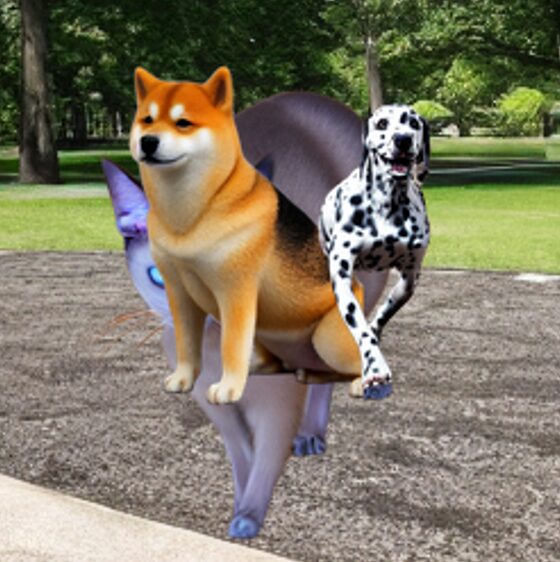
この場合、犬で隠れている元のマスクをそのまま使用すると、隠れている部分まで猫の領域としてアノテーションされていしまいます。
そのため、実際に見えている領域を計算する必要があります。
まず、各被写体の最終的なマスクを格納するvisible_masksと、すでに手前の被写体によって占有されている領域を記録するoccupiedを作成します。
visible_masks = [
    np.zeros_like(instance_masks[0])
    for _ in instance_masks
]

occupied = np.zeros_like(
    instance_masks[0],
    dtype=np.uint8,
)
被写体は後から配置されたものほど手前にあるため、マスクを後ろから順番に処理します。
for index in range(
    len(instance_masks) - 1,
    -1,
    -1,
):
現在の被写体のマスクから、すでに手前の被写体が存在している領域を除外します。
current = instance_masks[index].astype(bool)

visible = (
    current
    & ~occupied.astype(bool)
)
処理した領域はoccupiedへ追加します。
occupied = np.logical_or(
    occupied,
    current,
).astype(np.uint8)
これをすべての被写体に行い、重なりを考慮した各被写体のマスクを返します。
6.4. 被写体のバウンティングボックス(BBox)を計算
次に、犬・猫のマスク画像からBBoxを計算します。
def mask_to_bbox(mask: np.ndarray) -> list[float] | None:
    """二値マスクからCOCO形式[x, y, width, height]のBBoxを作る。"""
    ys, xs = np.where(mask > 0)

    if len(xs) == 0 or len(ys) == 0:
        return None

    x_min = int(xs.min())
    y_min = int(ys.min())
    x_max = int(xs.max())
    y_max = int(ys.max())

    width = x_max - x_min + 1
    height = y_max - y_min + 1

    return [float(x_min), float(y_min), float(width), float(height)]
まず、np.where()でマスクが0より大きいピクセルの座標を取得します。
ys, xs = np.where(mask > 0)xsには被写体領域のX座標、ysにはY座標が格納されます。
次に、それぞれの最大・最小値を取得します。
x_min = int(xs.min())
y_min = int(ys.min())
x_max = int(xs.max())
y_max = int(ys.max())
これによって、被写体を囲む矩形の左上と右下の座標が分かります。
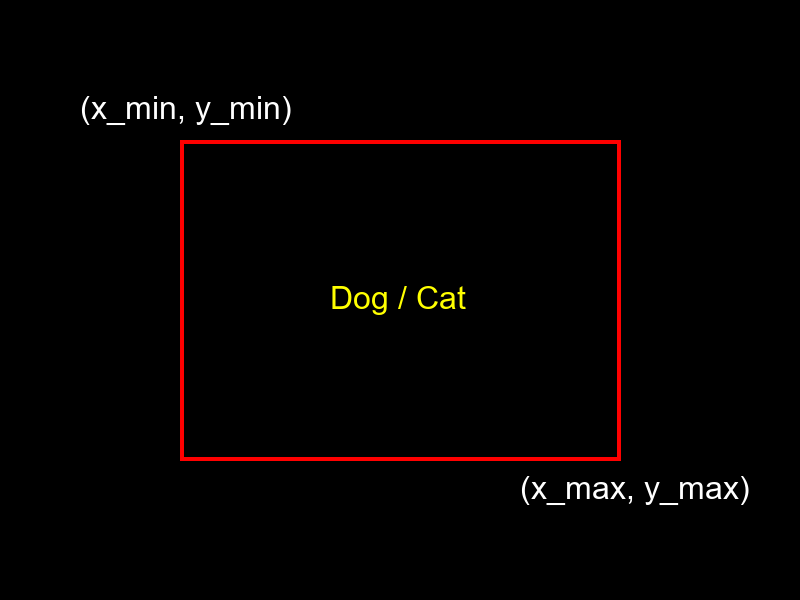
COCOフォーマットのBBoxは
[x, y, width, height]で表すため、最大座標と最小座標から幅と高さを計算します。
width = x_max - x_min + 1
height = y_max - y_min + 1
6.5. 被写体輪郭の検出
ここでは犬・猫のマスクから輪郭を検出し、COCOフォーマットのsegmentationで使用するPolygon形式に変換します。
def mask_to_polygons(mask: np.ndarray) -> list[list[float]]:
    """二値マスクをCOCO polygon segmentationへ変換する。"""
    mask_u8 = (mask > 0).astype(np.uint8) * 255

    contours, _ = cv2.findContours(
        mask_u8,
        cv2.RETR_EXTERNAL,
        cv2.CHAIN_APPROX_SIMPLE,
    )

    segmentation: list[list[float]] = []

    for contour in contours:
        if contour.shape[0] < 3:
            continue

        polygon = contour.reshape(-1, 2).astype(float).flatten().tolist()

        # x,yが3点以上 = 6要素以上
        if len(polygon) >= 6:
            segmentation.append(polygon)

    return segmentation
まず、OpenCVで輪郭検出ができるようにマスクを0~255の画像へ変換します。
mask_u8 = (mask > 0).astype(np.uint8) * 255次に、cv2.findContours()を使って被写体の輪郭を検出します。
contours, _ = cv2.findContours(
    mask_u8,
    cv2.RETR_EXTERNAL,
    cv2.CHAIN_APPROX_SIMPLE,
)
cv2.RETR_EXTERNALを指定しているため、最も外側の輪郭のみを取得します。
またcv2.CHAIN_APPROX_SIMPLEを使用することで輪郭を表現するために不要な中間点を省略しています。
例えばマスクから以下のような輪郭点が検出されたとします。
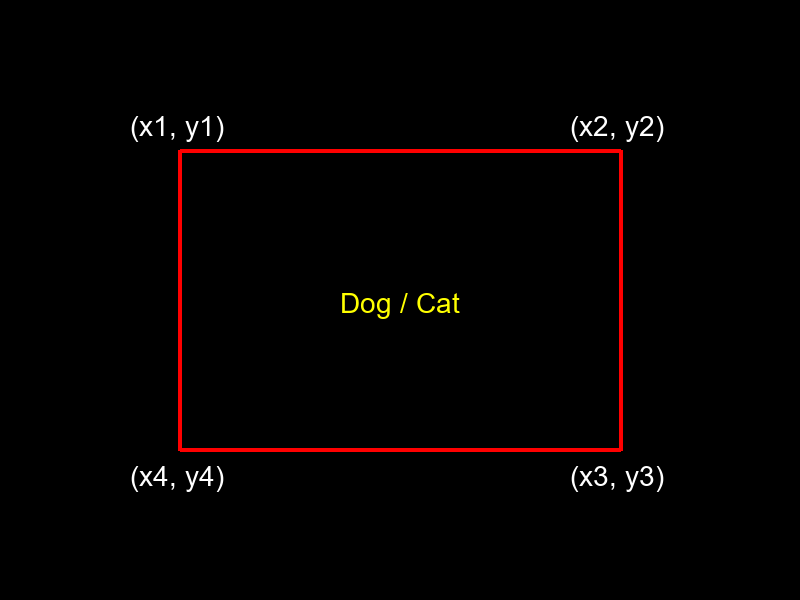
検出された輪郭はCOCOフォーマットで使用できるように
polygon = (
    contour
    .reshape(-1, 2)
    .astype(float)
    .flatten()
    .tolist()
)
として
[x1, y1, x2, y2, x3, y3, x4, y4, ...]という1次元リストに変換します。
COCOのPolygonは最低3点必要なので、x,yの3組以上(6要素以上)ある輪郭だけ追加します。
if len(polygon) >= 6:
    segmentation.append(polygon)
6.6. COCOアノテーション作成
作成したマスクからCOCOフォーマットのアノテーションデータを作成します。
def make_annotation(
    annotation_id: int,
    image_id: int,
    category_id: int,
    mask: np.ndarray,
) -> dict | None:
    """可視マスクから1件のCOCO annotationを生成する。"""
    area = int(mask.sum())

    if area < MIN_VISIBLE_AREA:
        return None

    bbox = mask_to_bbox(mask)
    if bbox is None:
        return None

    segmentation = mask_to_polygons(mask)
    if not segmentation:
        return None

    return {
        "id": annotation_id,
        "image_id": image_id,
        "category_id": category_id,
        "segmentation": segmentation,
        "area": float(area),
        "bbox": bbox,
        "iscrowd": 0,
    }
まず、マスクから被写体の面積を計算します。
area = int(mask.sum())今回のマスクは背景が0、被写体が1なのでmask.sum()によって被写体のピクセル数から面積を求めることができます。
被写体の可視領域が小さすぎる場合はアノテーションデータを作成しません。
if area < MIN_VISIBLE_AREA:
    return None
次に、先ほど開設した関数を使ってBBoxとPolygonを作成します。
bbox = mask_to_bbox(mask)

if bbox is None:
    return None
segmentation = mask_to_polygons(mask)
if not segmentation:
return Noneこれによって1つのマスクから「BBox」、「Polygon」、「Area」の情報を自動的に取得できます。
最後に、これらの情報をCOCOフォーマットにまとめて返します。
return {
    "id": annotation_id,
    "image_id": image_id,
    "category_id": category_id,
    "segmentation": segmentation,
    "area": float(area),
    "bbox": bbox,
    "iscrowd": 0,
}7. COCOフォーマットでデータセットを出力
これまで実装した関数から、犬・猫を1~5匹配置し、train/valへ分割しながらCOCOフォーマットの画像とアノテーションデータが入ったJSONファイルを出力します。
def compose_coco_dataset(
    cutout_entries: list[dict],
    background_count: int,
    train_ratio: float = 0.8,
) -> dict:
    """
    各backgroundに1~5匹を配置し、train/valへ分割して
    COCO画像とJSONを作成する。

    Parameters
    ----------
    train_ratio : float
        trainへ割り当てる割合。0.0より大きく1.0未満。
        例: 0.8 -> train 80%, val 20%
    """
    if not cutout_entries:
        raise RuntimeError("利用できるtarget画像がありません。")

    if not 0.0 < train_ratio < 1.0:
        raise ValueError("train_ratio は 0.0 より大きく 1.0 未満にしてください。")

    # 背景indexを先にシャッフルしてtrain/valを決定する。
    background_indices = list(range(background_count))
    random.shuffle(background_indices)

    train_count = int(background_count * train_ratio)
    train_indices = set(background_indices[:train_count])

    categories = [
        {
            "id": CATEGORY_DOG,
            "name": "dog",
            "supercategory": "animal",
        },
        {
            "id": CATEGORY_CAT,
            "name": "cat",
            "supercategory": "animal",
        },
    ]

    def create_coco_dict(description: str) -> dict:
        return {
            "info": {
                "description": description,
                "version": "1.0",
            },
            "licenses": [],
            "images": [],
            "annotations": [],
            "categories": categories,
        }

    train_coco = create_coco_dict("Synthetic dog/cat dataset - train")
    val_coco = create_coco_dict("Synthetic dog/cat dataset - val")

    train_annotation_id = 1
    val_annotation_id = 1
    train_image_id = 1
    val_image_id = 1

    for bg_index in range(background_count):
        background_path = BACKGROUND_RAW_DIR / f"background_{bg_index:06d}.png"

        if not background_path.exists():
            raise FileNotFoundError(
                f"background画像が見つかりません: {background_path}"
            )

        is_train = bg_index in train_indices

        if is_train:
            split_name = "train"
            output_dir = TRAIN_IMAGE_DIR
            coco = train_coco
            image_id = train_image_id
            annotation_id = train_annotation_id
        else:
            split_name = "val"
            output_dir = VAL_IMAGE_DIR
            coco = val_coco
            image_id = val_image_id
            annotation_id = val_annotation_id

        background = Image.open(background_path).convert("RGBA")
        canvas = background.copy()

        animal_count = random.randint(
            MIN_ANIMALS_PER_IMAGE,
            MAX_ANIMALS_PER_IMAGE,
        )

        placed_instances: list[dict] = []

        for _ in range(animal_count):
            entry = random.choice(cutout_entries)
            cutout = Image.open(entry["cutout_path"]).convert("RGBA")

            target_image, local_mask = prepare_random_target(cutout)

            if int(local_mask.sum()) < MIN_VISIBLE_AREA:
                continue

            full_mask, _, _ = place_target(
                canvas=canvas,
                target_image=target_image,
                target_mask=local_mask,
            )

            placed_instances.append(
                {
                    "category_id": entry["category_id"],
                    "mask": full_mask,
                }
            )

        # 最低1匹は配置する
        if not placed_instances:
            entry = random.choice(cutout_entries)
            cutout = Image.open(entry["cutout_path"]).convert("RGBA")
            target_image, local_mask = prepare_random_target(cutout)

            full_mask, _, _ = place_target(
                canvas=canvas,
                target_image=target_image,
                target_mask=local_mask,
            )

            placed_instances.append(
                {
                    "category_id": entry["category_id"],
                    "mask": full_mask,
                }
            )

        visible_masks = calculate_visible_masks(
            [instance["mask"] for instance in placed_instances]
        )

        filename = f"synthetic_{bg_index:06d}.png"
        output_path = output_dir / filename
        canvas.convert("RGB").save(output_path)

        coco["images"].append(
            {
                "id": image_id,
                "file_name": filename,
                "width": canvas.width,
                "height": canvas.height,
            }
        )

        valid_annotations = 0

        for instance, visible_mask in zip(
            placed_instances,
            visible_masks,
        ):
            annotation = make_annotation(
                annotation_id=annotation_id,
                image_id=image_id,
                category_id=instance["category_id"],
                mask=visible_mask,
            )

            if annotation is None:
                continue

            coco["annotations"].append(annotation)
            annotation_id += 1
            valid_annotations += 1

        if is_train:
            train_annotation_id = annotation_id
            train_image_id += 1
        else:
            val_annotation_id = annotation_id
            val_image_id += 1

        print(
            f"[{bg_index + 1:06d}/{background_count:06d}] "
            f"{split_name}: {filename} / instances={valid_annotations}"
        )

    with TRAIN_COCO_JSON_PATH.open("w", encoding="utf-8") as file:
        json.dump(train_coco, file, ensure_ascii=False, indent=2)

    with VAL_COCO_JSON_PATH.open("w", encoding="utf-8") as file:
        json.dump(val_coco, file, ensure_ascii=False, indent=2)

    print()
    print(f"Train images : {len(train_coco['images'])}")
    print(f"Val images   : {len(val_coco['images'])}")
    print(f"Train JSON   : {TRAIN_COCO_JSON_PATH.resolve()}")
    print(f"Val JSON     : {VAL_COCO_JSON_PATH.resolve()}")

    return {
        "train": train_coco,
        "val": val_coco,
    }
まず、背景画像のインデックスをシャッフルして、train_radioでtrainとvalの割合を決めます。
background_indices = list(range(background_count))
random.shuffle(background_indices)

train_count = int(background_count * train_ratio)
train_indices = set(background_indices[:train_count])
例えば
train_ratio = 0.8なら全体の80%をtrain、残り20%をvalとして使用します。
次に、犬と猫のカテゴリを定義します。
categories = [
    {
        "id": CATEGORY_DOG,
        "name": "dog",
        "supercategory": "animal",
    },
    {
        "id": CATEGORY_CAT,
        "name": "cat",
        "supercategory": "animal",
    },
]
そして、train用とval用にそれぞれCOCOフォーマットの辞書を作成します。
train_coco = create_coco_dict(
    "Synthetic dog/cat dataset - train"
)

val_coco = create_coco_dict(
    "Synthetic dog/cat dataset - val"
)
各背景画像を読み込み、配置する犬・猫の数をランダムに決定します。
animal_count = random.randint(
    MIN_ANIMALS_PER_IMAGE,
    MAX_ANIMALS_PER_IMAGE,
)
例えば、
MIN_ANIMALS_PER_IMAGE = 1
MAX_ANIMALS_PER_IMAGE = 5
なら1枚の背景に1~5匹を配置します。
配置する犬・猫もランダムに選択します。
entry = random.choice(cutout_entries)選択した被写体は
target_image, local_mask = prepare_random_target(cutout)で左右反転・縮小を行い、
full_mask, _, _ = place_target(
    canvas=canvas,
    target_image=target_image,
    target_mask=local_mask,
)
で背景画像のランダムな位置へ配置します。
この処理を繰り返すことで、
- 犬だけ
- 猫だけ
- 犬と猫が混在
など様々な合成画像を作成できます。
配置した犬・猫が重なっている場合は
visible_masks = calculate_visible_masks(
    [instance["mask"] for instance in placed_instances]
)
によって実際に見えている領域だけを計算します。
画像がtrainに割り当てられている場合はtrainフォルダ、valの場合はvalフォルダへ保存します。
filename = f"synthetic_{bg_index:06d}.png"
output_path = output_dir / filename

canvas.convert("RGB").save(output_path)
同時に、COCOのimagesへ画像情報を追加します。
coco["images"].append(
    {
        "id": image_id,
        "file_name": filename,
        "width": canvas.width,
        "height": canvas.height,
    }
)
配置した各被写体について、make_annotation()を使ってCOCOフォーマットのアノテーションを作成します。
annotation = make_annotation(
    annotation_id=annotation_id,
    image_id=image_id,
    category_id=instance["category_id"],
    mask=visible_mask,
)
作成したアノテーションは
coco["annotations"].append(annotation)でtrainまたはvalのCOCOデータへ追加します。
すべての処理が終わったら、trainとvalのアノテーションをそれぞれJSONで保存します。
with TRAIN_COCO_JSON_PATH.open(
    "w",
    encoding="utf-8",
) as file:
    json.dump(
        train_coco,
        file,
        ensure_ascii=False,
        indent=2,
    )
最終的には以下のような構成になります。
synthetic_coco_dataset/
├─ annotation/
│  ├─ instances_train.json
│  └─ instances_val.json
├─ train/
│  ├─ synthetic_000001.png
│  └─ ...
└─ val/
   ├─ synthetic_000010.png
└─ ...8. 実行結果
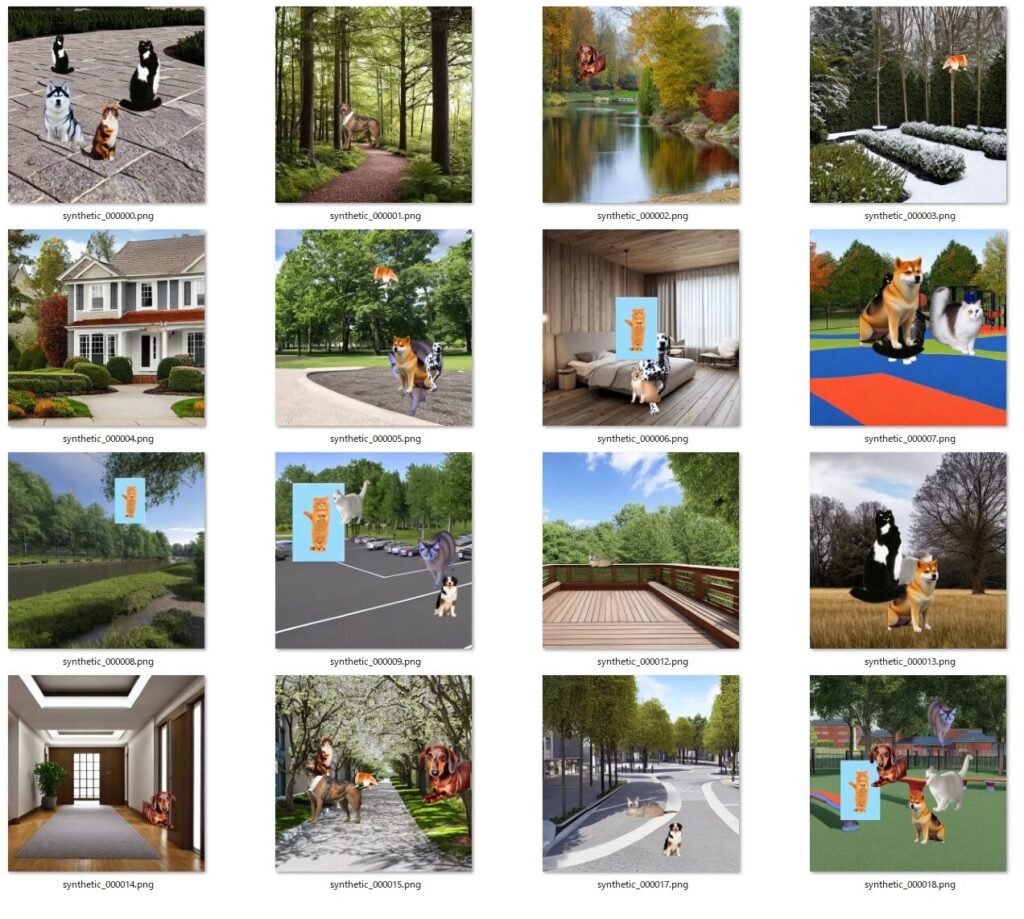
今回は実験として、犬と猫をそれぞれ10匹ずつ、背景を20個生成し、各背景に対して犬と猫をランダムに配置したデータセットを生成してみました。
・実験環境
- OS:Windows 11
- GPU:GeForce RTX 5070 Ti
- VRAM:16GB
- Ollama:0.32.5
- Stable Diffusion:1.5
プロンプト生成~データセット出力まで約90秒程度でした。
出力結果はこちらです。
・train
・val
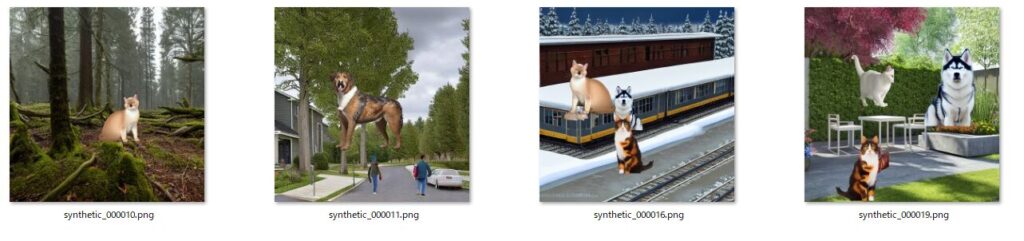
被写体と背景画像の合成は成功していましたが、被写体の背景削除に失敗している画像がある…
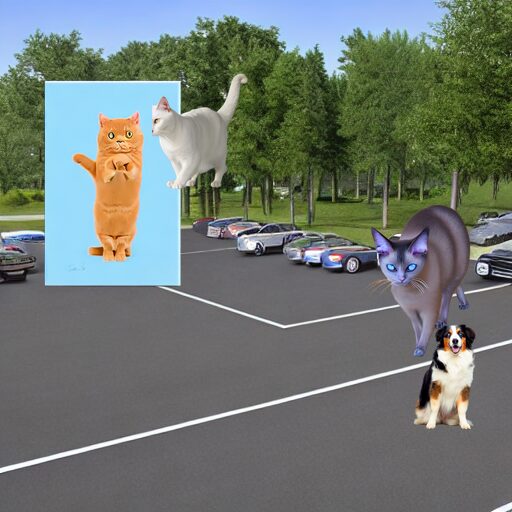
と思って元の画像を見てみました。

水色の背景だと思っていたのは本体?だったので、背景の削除は成功しているといっていいのかも。
なるほど、こういうパターンもあるんですね。
実際にはもっと大量に生成して精度の低い画像は弾くといった作業が必要かもしれません。
9. まとめ
今回は画像生成用プロンプトの生成から画像生成、データセット出力までを一括で行う流れについてまとめました。
今回は20枚程度出力してみましたが、学習に使用する際には自動化の利点を生かして数千~数万枚分のデータセットを生成し、実画像の推論でどの程度精度が出るのか試してみたいと思います。
実際にはドメインギャップの問題でAI画像数千枚で学習させるより実画像数十枚で学習させた方が精度が出る場合が多いので、これは今後の課題ですね。
今回は以上です。
※ 今回のコードはGitHubにアップロードしました。ご興味があればぜひ。
10. 参考サイト
Detectron2 × COCO形式アノテーション:独自の画像で高精度セグメンテーションモデルの作成方法
https://zenn.dev/idnet/articles/13e126e0b5dd51
11. 関連書籍
PyTorchを基礎から学びたい方はこちらの書籍がおすすめです。


コメント