

本記事はアフィリエイト広告(PR)を含みます
PythonでDeep Learningを学習させる場合はPytorchを使用される方が多いと思いますが、Pytorchで学習させたモデルをPytorch以外のフレームワークで推論させたい場合があると思います。
そんな時に便利なのがONNXと呼ばれるフォーマットです。
今回はPytorchで学習されたモデルをONNX形式に変換し、ONNX形式のモデルを読み込んで推論させる方法についてまとめました。
1. ONNXとは
Open Neural Network Exchangeの略で「オニキス」と読みます。
MicrosoftとFacebookによって共同で開発され、PytorchやTensorflowなど異なるプラットフォームで学習されたモデルであってもONNX形式に変換することで様々なデバイスやプラットフォームで互換性を持たせた運用が可能となります。
なおONNXは推論のみ対応しており学習はできません。
2. ONNXのインストール
まずはPythonでONNXをインストールします。
Anacondaなどで作成した仮想環境を使用している場合は、Pytorchがインストールされている環境で以下のコマンドを入力する。なおここではCPU版を想定しています。
pip install onnx
pip install onnxruntime3. テストデータダウンロード
Pytorchに実装されているMask R-CNNの学習済みモデルを使用します。
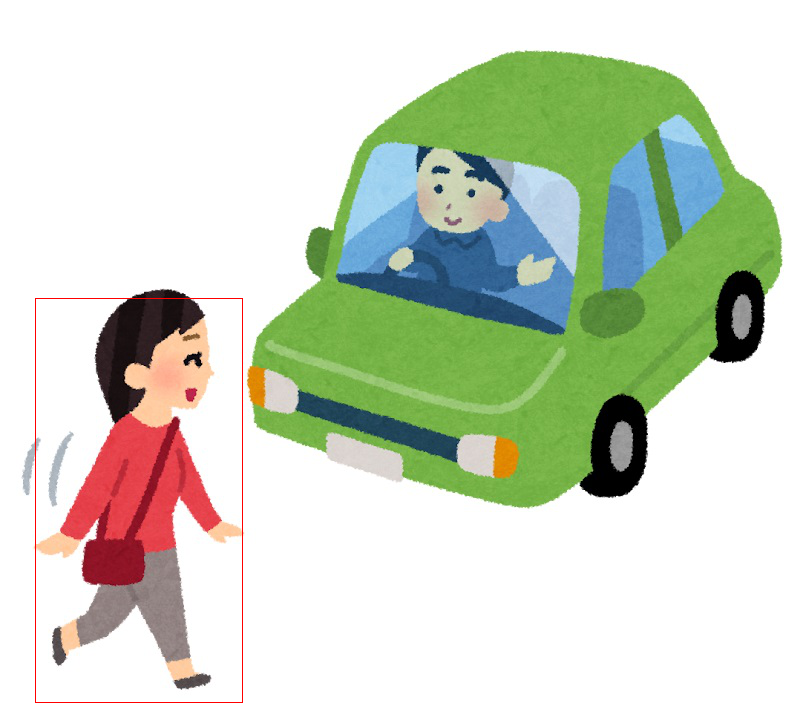
今回はいらすとやから「歩行者」のイラストをダウンロードしました。
なお、ダウンロードした画像は4チャンネルだったので、分かりやすいようにペイントで保存しなおして3チャンネルにしました。


4. PytorchでMask R-CNNの動作確認
次にPytorchでMask R-CNNの学習済みモデルをダウンロードし、推論して結果を表示してみます。
import torch
import torchvision
import torchvision.transforms as transforms
from PIL import Image,ImageDraw
import numpy as np

model = torchvision.models.detection.maskrcnn_resnet50_fpn(pretrained=True)

device = torch.device('cpu')
model.to(device)

model.eval()

transform = transforms.Compose([transforms.ToTensor()])

image_path = "car_hokousya_yuzuru.jpg"
img = Image.open(image_path)
img = transform(img)
print(img.shape)

with torch.no_grad():
    prediction = model([img.to(device)])

print(prediction)

result = Image.open(image_path)
draw = ImageDraw.Draw(result)

x = int(prediction[0]['boxes'][0][0])
y = int(prediction[0]['boxes'][0][1])
width = int(prediction[0]['boxes'][0][2])
height = int(prediction[0]['boxes'][0][3])
draw.rectangle([(x, y), (width, height)], outline=(255, 0, 0), width=1)

mask = Image.fromarray(prediction[0]['masks'][0, 0].mul(255).byte().cpu().numpy())

result.show()
mask.show()
# モデルの保存
torch.save(model, 'mask_rcnn.pth')
実行結果はこちら。
torch.Size([3, 723, 800])
[{'boxes': tensor([[ 35.4306, 298.3299, 242.7131, 702.2053],
        [410.1870, 149.0285, 514.7666, 236.1316],
        [234.4895,  45.8209, 778.0942, 535.2914],
        [ 75.2374, 428.2332, 178.3807, 589.2944],
        [ 85.4877, 430.6817, 176.0164, 586.7604],
        [ 79.4442, 504.1732, 149.3478, 584.0921],
        [252.3257,  46.2663, 765.1949, 486.8453],
        [388.9589, 149.7441, 532.5169, 276.6328],
        [ 38.0946, 284.3072, 234.6688, 681.1718],
        [ 68.8430, 418.8548, 187.2998, 594.0205],
        [219.0990,  54.3844, 762.0739, 551.4306],
        [390.1831, 150.0502, 527.9808, 266.1282],
        [225.8357,  61.0794, 793.6351, 523.8013],
        [411.2248, 151.3200, 517.7290, 237.9316],
        [239.3150,  55.5526, 780.3926, 528.3063],
        [239.6980,  58.8000, 771.5941, 512.8947],
        [251.5796,  59.5233, 757.5197, 537.8915]]), 'labels': tensor([ 1, 88, 38, 31, 32, 31, 28, 88, 88, 27,  8,  1, 84, 16, 61, 13, 88]), 'scores': tensor([0.9915, 0.9356, 0.5372, 0.5215, 0.3376, 0.2451, 0.2055, 0.1932, 0.1561,
        0.1257, 0.1028, 0.0993, 0.0715, 0.0671, 0.0637, 0.0606, 0.0602]), 'masks': tensor([[[[0., 0., 0.,  ..., 0., 0., 0.],
          [0., 0., 0.,  ..., 0., 0., 0.],
          [0., 0., 0.,  ..., 0., 0., 0.],
          ...,
          [0., 0., 0.,  ..., 0., 0., 0.],
          [0., 0., 0.,  ..., 0., 0., 0.],
          [0., 0., 0.,  ..., 0., 0., 0.]]],


        [[[0., 0., 0.,  ..., 0., 0., 0.],
          [0., 0., 0.,  ..., 0., 0., 0.],
          [0., 0., 0.,  ..., 0., 0., 0.],
          ...,
          [0., 0., 0.,  ..., 0., 0., 0.],
          [0., 0., 0.,  ..., 0., 0., 0.],
          [0., 0., 0.,  ..., 0., 0., 0.]]],


        [[[0., 0., 0.,  ..., 0., 0., 0.],
          [0., 0., 0.,  ..., 0., 0., 0.],
          [0., 0., 0.,  ..., 0., 0., 0.],
          ...,
          [0., 0., 0.,  ..., 0., 0., 0.],
          [0., 0., 0.,  ..., 0., 0., 0.],
          [0., 0., 0.,  ..., 0., 0., 0.]]],


        ...,


        [[[0., 0., 0.,  ..., 0., 0., 0.],
          [0., 0., 0.,  ..., 0., 0., 0.],
          [0., 0., 0.,  ..., 0., 0., 0.],
          ...,
          [0., 0., 0.,  ..., 0., 0., 0.],
          [0., 0., 0.,  ..., 0., 0., 0.],
          [0., 0., 0.,  ..., 0., 0., 0.]]],


        [[[0., 0., 0.,  ..., 0., 0., 0.],
          [0., 0., 0.,  ..., 0., 0., 0.],
          [0., 0., 0.,  ..., 0., 0., 0.],
          ...,
          [0., 0., 0.,  ..., 0., 0., 0.],
          [0., 0., 0.,  ..., 0., 0., 0.],
          [0., 0., 0.,  ..., 0., 0., 0.]]],


        [[[0., 0., 0.,  ..., 0., 0., 0.],
          [0., 0., 0.,  ..., 0., 0., 0.],
          [0., 0., 0.,  ..., 0., 0., 0.],
          ...,
          [0., 0., 0.,  ..., 0., 0., 0.],
          [0., 0., 0.,  ..., 0., 0., 0.],
          [0., 0., 0.,  ..., 0., 0., 0.]]]])}]
学習済みデータをそのまま使用しているので誤検出が多いですが、とりあえず1つ目の検出結果のboxを描画し、マスク画像を出力してみます。

5. PytorchモデルからONNX形式への変換
先ほど保存したPytorchモデル「mask_rcnn.pth」をONNX形式へ変換します。
import torch
import torch.onnx as torch_onnx

# モデルの読み込み
model = torch.load('mask_rcnn.pth')

device = torch.device('cpu')
model.to(device)

model.eval()

# モデル出力のための設定
onnx_path = "mask_rcnn.onnx"
# データを入力する際の名称
input_names = [ "input" ]
# 出力データを取り出す際の名称
output_names = [ "boxes","labels","scores","masks" ]

# ダミーインプット作成
input_shape = (3, 723, 800) #入力データ形式
batch_size = 1              #入力データバッチサイズ
input = torch.randn(batch_size, *input_shape) # ダミーインプットデータ

output = torch_onnx.export(model, input, onnx_path,
                   verbose=True, input_names=input_names,
output_names=output_names)これにより、ONNX形式に変換されたモデル「mask_rcnn.onnx」が生成される。
6. ONNX形式モデルによる推論
最後にONNX形式に変換したモデルで推論を行い、Pytorchの結果と比較してみます。
import onnxruntime
import numpy as np
import torch
import torchvision.transforms as transforms
from PIL import Image,ImageDraw

transform = transforms.Compose([transforms.ToTensor()])

image_path = "car_hokousya_yuzuru.jpg"
img = Image.open(image_path)
img = transform(img).unsqueeze(0)
img = np.array(img)
print(img.shape)

ort_session = onnxruntime.InferenceSession("mask_rcnn.onnx")
input_name = ort_session.get_inputs()[0].name
print("Input name  :", input_name)
input_shape = ort_session.get_inputs()[0].shape
print("Input shape :", input_shape)
input_type = ort_session.get_inputs()[0].type
print("Input type  :", input_type)

output_name = []
for i in range(4):
    output_name.append(ort_session.get_outputs()[i].name)
    print("Output name  :", output_name[i])
    output_shape = ort_session.get_outputs()[i].shape
    print("Output shape :", output_shape)
    output_type = ort_session.get_outputs()[i].type
    print("Output type  :", output_type)


#result = ort_session.run([output_name[0],output_name[1]], {"input": img})
result = ort_session.run(output_name, {"input": img})

print(result)

img = Image.open(image_path)
draw = ImageDraw.Draw(img)

x = int(result[0][0][0])
y = int(result[0][0][1])
width = int(result[0][0][2])
height = int(result[0][0][3])
draw.rectangle([(x, y), (width, height)], outline=(255, 0, 0), width=1)

tensor_mask = torch.as_tensor(result[3][0][0], dtype=torch.float32)
mask = Image.fromarray(tensor_mask.mul(255).byte().cpu().numpy())

img.show()
mask.show()
今回は入力と出力の「名前(name)」、「次元数(shape)」、「型(type)」を表示しています。
また
ort_session.runでは出力名を指定することにより指定した出力のみを取り出すことも可能です。
こちらが実行結果です。
(1, 3, 723, 800)
Input name  : input
Input shape : [1, 3, 723, 800]
Input type  : tensor(float)
Output name  : boxes
Output shape : ['Concatboxes_dim_0', 4]
Output type  : tensor(float)
Output name  : labels
Output shape : ['Gatherlabels_dim_0']
Output type  : tensor(int64)
Output name  : scores
Output shape : ['Gatherlabels_dim_0']
Output type  : tensor(float)
Output name  : masks
Output shape : ['Unsqueezemasks_dim_0', 'Unsqueezemasks_dim_1', 'Unsqueezemasks_dim_2', 'Unsqueezemasks_dim_3']
Output type  : tensor(float)
2024-09-25 20:26:39.1471417 [W:onnxruntime:, execution_frame.cc:870 onnxruntime::ExecutionFrame::VerifyOutputSizes] Expected shape from model of {1,723,800} does not match actual shape of {2,723,800} for output res_append.3
2024-09-25 20:26:39.1570308 [W:onnxruntime:, execution_frame.cc:870 onnxruntime::ExecutionFrame::VerifyOutputSizes] Expected shape from model of {1,723,800} does not match actual shape of {3,723,800} for output res_append.3
2024-09-25 20:26:39.1647253 [W:onnxruntime:, execution_frame.cc:870 onnxruntime::ExecutionFrame::VerifyOutputSizes] Expected shape from model of {1,723,800} does not match actual shape of {4,723,800} for output res_append.3
2024-09-25 20:26:39.1757879 [W:onnxruntime:, execution_frame.cc:870 onnxruntime::ExecutionFrame::VerifyOutputSizes] Expected shape from model of {1,723,800} does not match actual shape of {5,723,800} for output res_append.3
2024-09-25 20:26:39.1845898 [W:onnxruntime:, execution_frame.cc:870 onnxruntime::ExecutionFrame::VerifyOutputSizes] Expected shape from model of {1,723,800} does not match actual shape of {6,723,800} for output res_append.3
2024-09-25 20:26:39.1966970 [W:onnxruntime:, execution_frame.cc:870 onnxruntime::ExecutionFrame::VerifyOutputSizes] Expected shape from model of {1,723,800} does not match actual shape of {7,723,800} for output res_append.3
2024-09-25 20:26:39.2095891 [W:onnxruntime:, execution_frame.cc:870 onnxruntime::ExecutionFrame::VerifyOutputSizes] Expected shape from model of {1,723,800} does not match actual shape of {8,723,800} for output res_append.3
2024-09-25 20:26:39.2197758 [W:onnxruntime:, execution_frame.cc:870 onnxruntime::ExecutionFrame::VerifyOutputSizes] Expected shape from model of {1,723,800} does not match actual shape of {9,723,800} for output res_append.3
2024-09-25 20:26:39.2307008 [W:onnxruntime:, execution_frame.cc:870 onnxruntime::ExecutionFrame::VerifyOutputSizes] Expected shape from model of {1,723,800} does not match actual shape of {10,723,800} for output res_append.3
2024-09-25 20:26:39.2441389 [W:onnxruntime:, execution_frame.cc:870 onnxruntime::ExecutionFrame::VerifyOutputSizes] Expected shape from model of {1,723,800} does not match actual shape of {11,723,800} for output res_append.3
2024-09-25 20:26:39.2557606 [W:onnxruntime:, execution_frame.cc:870 onnxruntime::ExecutionFrame::VerifyOutputSizes] Expected shape from model of {1,723,800} does not match actual shape of {12,723,800} for output res_append.3
2024-09-25 20:26:39.2673093 [W:onnxruntime:, execution_frame.cc:870 onnxruntime::ExecutionFrame::VerifyOutputSizes] Expected shape from model of {1,723,800} does not match actual shape of {13,723,800} for output res_append.3
2024-09-25 20:26:39.2784660 [W:onnxruntime:, execution_frame.cc:870 onnxruntime::ExecutionFrame::VerifyOutputSizes] Expected shape from model of {1,723,800} does not match actual shape of {14,723,800} for output res_append.3
2024-09-25 20:26:39.2918606 [W:onnxruntime:, execution_frame.cc:870 onnxruntime::ExecutionFrame::VerifyOutputSizes] Expected shape from model of {1,723,800} does not match actual shape of {15,723,800} for output res_append.3
2024-09-25 20:26:39.3058643 [W:onnxruntime:, execution_frame.cc:870 onnxruntime::ExecutionFrame::VerifyOutputSizes] Expected shape from model of {1,723,800} does not match actual shape of {16,723,800} for output res_append.3
2024-09-25 20:26:39.3197315 [W:onnxruntime:, execution_frame.cc:870 onnxruntime::ExecutionFrame::VerifyOutputSizes] Expected shape from model of {1,723,800} does not match actual shape of {17,723,800} for output res_append.3
[array([[ 35.430737, 298.33002 , 242.713   , 702.20544 ],
       [410.18704 , 149.02856 , 514.76666 , 236.13174 ],
       [234.48979 ,  45.820522, 778.0939  , 535.29156 ],
       [ 75.2374  , 428.23352 , 178.3806  , 589.2943  ],
       [ 85.48766 , 430.68158 , 176.01642 , 586.76013 ],
       [ 79.444214, 504.17307 , 149.34782 , 584.09216 ],
       [252.32588 ,  46.26593 , 765.19464 , 486.84467 ],
       [388.95837 , 149.7441  , 532.5167  , 276.63217 ],
       [ 38.094936, 284.3071  , 234.66896 , 681.17126 ],
       [ 68.84296 , 418.85474 , 187.29965 , 594.0207  ],
       [219.09695 ,  54.383724, 762.0733  , 551.4318  ],
       [390.18362 , 150.05019 , 527.9804  , 266.127   ],
       [225.83592 ,  61.078915, 793.6351  , 523.8013  ],
       [411.2248  , 151.32013 , 517.72894 , 237.93147 ],
       [239.31497 ,  55.552246, 780.3923  , 528.3064  ],
       [239.69777 ,  58.799793, 771.5938  , 512.89453 ],
       [251.57953 ,  59.52306 , 757.5194  , 537.891   ]], dtype=float32), array([ 1, 88, 38, 31, 32, 31, 28, 88, 88, 27,  8,  1, 84, 16, 61, 13, 88],
      dtype=int64), array([0.9915332 , 0.9355937 , 0.5371729 , 0.52149415, 0.33760455,
       0.24512398, 0.20552796, 0.19317165, 0.1560636 , 0.12569654,
       0.10275479, 0.09933849, 0.07151971, 0.06709407, 0.06372371,
       0.06062203, 0.06018863], dtype=float32), array([[[[0., 0., 0., ..., 0., 0., 0.],
         [0., 0., 0., ..., 0., 0., 0.],
         [0., 0., 0., ..., 0., 0., 0.],
         ...,
         [0., 0., 0., ..., 0., 0., 0.],
         [0., 0., 0., ..., 0., 0., 0.],
         [0., 0., 0., ..., 0., 0., 0.]]],


       [[[0., 0., 0., ..., 0., 0., 0.],
         [0., 0., 0., ..., 0., 0., 0.],
         [0., 0., 0., ..., 0., 0., 0.],
         ...,
         [0., 0., 0., ..., 0., 0., 0.],
         [0., 0., 0., ..., 0., 0., 0.],
         [0., 0., 0., ..., 0., 0., 0.]]],


       [[[0., 0., 0., ..., 0., 0., 0.],
         [0., 0., 0., ..., 0., 0., 0.],
         [0., 0., 0., ..., 0., 0., 0.],
         ...,
         [0., 0., 0., ..., 0., 0., 0.],
         [0., 0., 0., ..., 0., 0., 0.],
         [0., 0., 0., ..., 0., 0., 0.]]],


       ...,


       [[[0., 0., 0., ..., 0., 0., 0.],
         [0., 0., 0., ..., 0., 0., 0.],
         [0., 0., 0., ..., 0., 0., 0.],
         ...,
         [0., 0., 0., ..., 0., 0., 0.],
         [0., 0., 0., ..., 0., 0., 0.],
         [0., 0., 0., ..., 0., 0., 0.]]],


       [[[0., 0., 0., ..., 0., 0., 0.],
         [0., 0., 0., ..., 0., 0., 0.],
         [0., 0., 0., ..., 0., 0., 0.],
         ...,
         [0., 0., 0., ..., 0., 0., 0.],
         [0., 0., 0., ..., 0., 0., 0.],
         [0., 0., 0., ..., 0., 0., 0.]]],


       [[[0., 0., 0., ..., 0., 0., 0.],
         [0., 0., 0., ..., 0., 0., 0.],
         [0., 0., 0., ..., 0., 0., 0.],
         ...,
         [0., 0., 0., ..., 0., 0., 0.],
         [0., 0., 0., ..., 0., 0., 0.],
         [0., 0., 0., ..., 0., 0., 0.]]]], dtype=float32)]
途中で出力されている警告はパフォーマンスに影響しないそうなので今回は無視します。
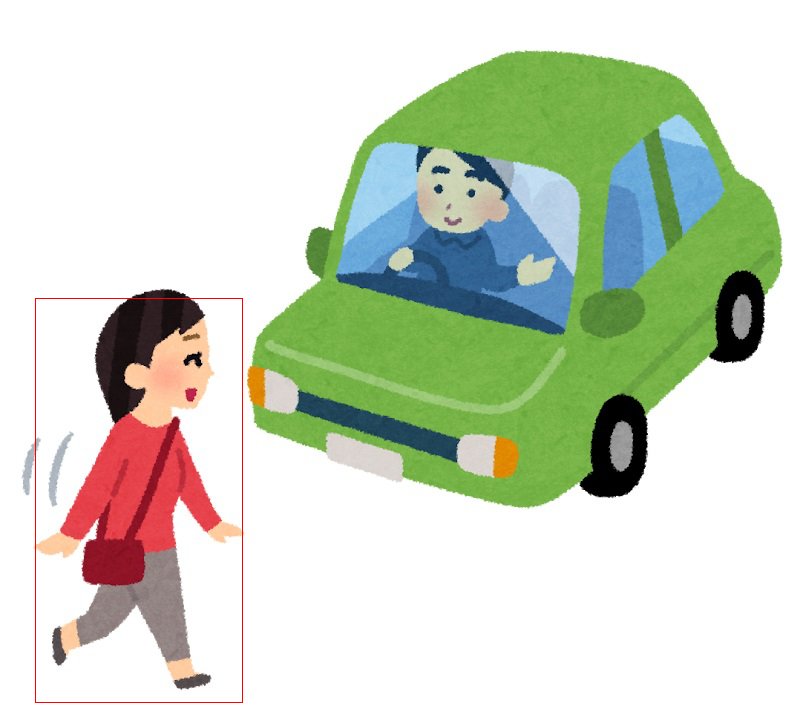

Pytorchと同様の結果が出力されたことが確認できました。
今回は以上です。
7. 参考サイト
・Torchvisionを利用した物体検出のファインチューニング手法
https://colab.research.google.com/github/YutaroOgawa/pytorch_tutorials_jp/blob/main/notebook/2_Image_Video/2_2_torchvision_finetuning_instance_segmentation_jp.ipynb#scrollTo=_t4TBwhHTdkd
・Inference for a simple model with ONNX Runtime
https://github.com/onnx/onnx-docker/blob/master/onnx-ecosystem/inference_demos/simple_onnxruntime_inference.ipynb


コメント